-
 Course description: “How do you close the feedback loop with your users? This session will review some innovative ways companies are connecting with CA PPM users to drive constant innovation and improve perception of the process and tool.” Download file is the presentation slide deck.
 -
 Aligning work to organizational strategy is a fundamental requirement in today's ever-changing marketplace. High performing organizations are moving beyond basic connections to introduce strategic hierarchies that are tied to real measurements of business value via Clarity's Objectives and Key Results (OKRs). Join our expert guides as they present key concepts, best practices, and the evolution of strategic alignment.
 -
 In today's business world, there are many threats to our ability to remain focused and productive. In this session we'll borrow learnings from sources like the best-selling book "Atomic Habits," other renowned thought leaders, and even from the worlds of sports, yoga, and meditation. We will discuss and practice some tools and methods you can begin using right away to improve your productivity while maintaining your own wellbeing and balance.
 -
 This session dives into the impact of misaligned data between planning and delivery systems—and what it costs your organization in rework, delays, and missed opportunities. Learn how connecting Clarity and Jira enables real-time synchronization between portfolio planning and Agile execution, giving CIOs the visibility, traceability, and confidence to drive outcomes—not just activity.
 -
 The industry has been talking about "Connecting Strategy to Execution" for years; Yet many organizations still struggle to make this a reality. During this interactive session, we will guide you through creating a one-page mapping of high-level values, missions, and vision with strategic goals and associated programs of work aligned for the delivery of value.
 -
 This training document is a Rego Consulting Quick Reference Guide to assist with the use of Sub-Objects and Channels in Clarity’s Modern UX.
 -
 Course Description: Have you ever thought of using Clarity PPM for surveys or quality audits? Would you like to create dashboards with metrics from surveys, lessons learned, project audits, and quality? In this class, we will review a customer use case where all of this was done in Clarity PPM—linking to SharePoint to capture survey results, then producing dashboards inside of PPM and SharePoint based on very specific metrics.
 -
 Change is constant in an organization, and each change is more than just a one-time event. This session will talk about keys to successfully sustaining change adoption vs. just implementing change in your organization.
 -
 Course description: “Do CA PPM performance issues discourage your users? This class will review the root causes behind CA PPM performance problems and identify steps to improve performance, including specific recommendations and real case studies.”
 -
 SPM in Action - a client case study. A current Rego client (Eaton Engineering) will share their SPM journey, including why it was necessary, the technical challenges they faced and how they were addressed, the impact of organizational change, how Rego's expertise and technical assets supported the implementation, and the benefits they're now seeing with their new operating model.
 -
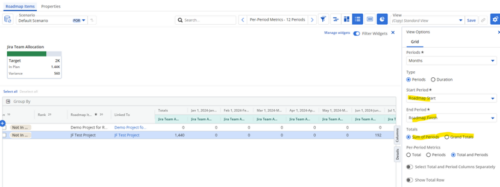
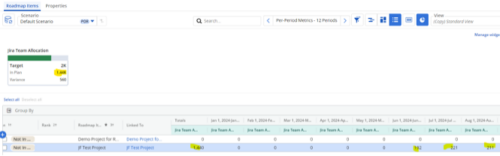 Capture and present allocation data by Team for the Investments included in your Roadmap to enable the ability to compare to Targets or Limits. Allocation data can be presented in Hours or FTE, for Teams Only.
 -
 To effectively practice Agile at scale, Clarity teams first need to identify various needs. This includes thinking through considerations for funding, investment prioritization, and spend management practices.
 -
 Over time notifications can build up in the CA PPM system and should be purged, so as not to hinder performance. The SQL statements mentioned in the tech doc can be implemented within a process in CA PPM to either purge notifications on an ongoing basis or remove all of them at once.
 -
 How do you prioritize work? In many organizations, the traditional forced ranking scale (1-x) alone just isn’t sufficient. There are financial and resource constraints to consider. We must also align with strategic objectives, OKRs, or business outcomes. So how do we go about creating a plan which layers in-flight and proposed work within all these considerations, to create a balanced and prioritized roadmap? How do you drive priorities without driving yourselves crazy? In this session, we will share best practices and lessons learned. You will get a hands-on exploration of a practical, realistic, and flexible approach for bringing all the pieces together to satisfy your organization's planning needs.
 -
 Course Description: The concepts of creativity are tools and habits that help you and your team become more creative. During this session, you will learn simple tricks and methods to encourage a more creative environment within your teams. Creativity training includes emotional intelligence and behavioral aspects, all-in-one.
 -
 "The concepts of creativity are tools and habits that help you and your team become more creative. During this session, you will learn simple tricks and methods to encourage a more creative work environment. Join this session to learn how to structure an effective team meetings, workshops and all-inclusive ideation sessions. Even learn about some great work habits to boost your career! "
 -
 With its end-to-end capabilities and aggregated data, ValueOps is an ideal platform on which to build the ultimate AI for value stream management. In this must-see session, Jean-Louis Vignaud, Head of ValueOps, will outline his vision of how our next generation of AI features will help deliver curated visibility, guided alignment, and augmented efficiency to the enterprise.
 -
 Join this session to learn best practices of when to use what module in Clarity (roadmaps vs hierarchies, CITs vs Projects...). Let’s really look at the power and adaptability of Modern UX features, through the lens of finding the best fit to meet the needs of your end users and business processes.
 -
 Join this session for best practices in optimizing Clarity's Modern UX modules. Learn how - and when - to use specific modules in Clarity (roadmaps vs hierarchies, CITs vs Projects, etc.). Let’s really dive into the power and adaptability of Modern UX features, through the lens of finding the best fit to meet the needs of your end users and business processes.
 -
 How do you address ever-growing backlogs and impatient demands from internal or external customers, while also balancing the desire to innovate with the need to maintain high performance and quality? This session focuses on proven techniques - learned over several years and iterations - to help win the battle against these challenges.
 -
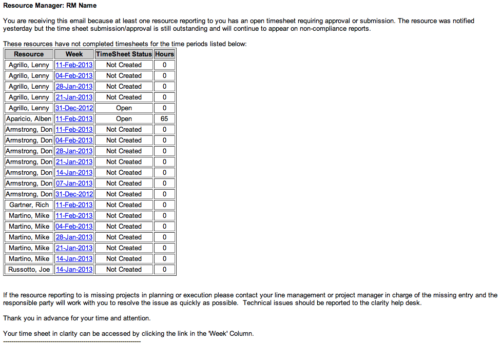 The Time Tracking Stalker - RM workflow process automatically sends an email to Resource Managers for each one of their resources that have not submitted their timesheet for a prior open time period, thus informing the RM if their resources are submitting their timesheets on time. Project Managers will also benefit since the notifications will help to ensure that time is being posted against their projects in a timely manner, helping to provide them with an accurate view of time expended on the projects.
 -
The Time Tracking Stalker - RM workflow process automatically sends an email to Resource Managers for each one of their resources that have not submitted their timesheet for a prior open time period, thus informing the RM if their resources are submitting their timesheets on time. Project Managers will also benefit since the notifications will help to ensure that time is being posted against their projects in a timely manner, helping to provide them with an accurate view of time expended on the projects.
-
The Time Tracking Stalker - RM workflow process automatically sends an email to Resource Managers for each one of their resources that have not submitted their timesheet for a prior open time period, thus informing the RM if their resources are submitting their timesheets on time. Project Managers will also benefit since the notifications will help to ensure that time is being posted against their projects in a timely manner, helping to provide them with an accurate view of time expended on the projects.
-
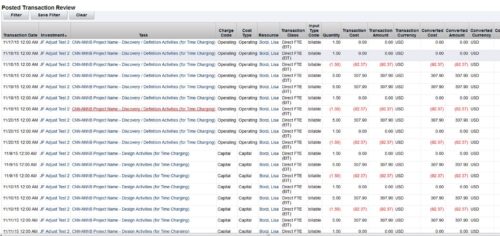 This is an automation to adjust the cost in financials (WIP) based on the standard weekly hours for salaried (Exempt) personnel. The process adjusts only the cost in WIP where the hours per week that are posted for a resource are more than the standard work week. The Posted hours in the timesheet and in WIP remain untouched. For the process to calculate correctly, all time in a given week needs to be accounted for, including all non-project time. The process has three input parameters as explained below:
- wkStdHour: Standard Weekly Hours; this can be changed in the process gel script. The parameter is based on the organization standard work week. The default is set to 40 hours.
- xogBatchSize: The XOG batch size. This is used to upload data in batches to avoid high memory and performance issues. The default batch size is set to 50 records.
- username: The resource name that the process uses for uploading data. The default is set to admin.
- It will process all the timesheets in posted state provided the timesheet has not been adjusted earlier by this process and there are no pending transactions to be posted for it. Validation is made based on Notes field, which is populated once adjustment is done by the process.
- Notes field should not be modified in Script nor should be worked upon by any other process.
- All the invalid transactions should be cleared and post to WIP should be finished with no pending records.
-
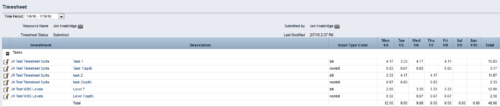
 The Timesheet Smoothing Process Workflow kicks-off when an individual timesheet is Submitted. It splits each transaction on the timesheet when total timesheet actuals exceed total weekly availability for the resource. Total weekly availability is determined by multiplying resource availability rate by the number of workdays in the week. Non-workdays include weekends, holidays, PTO, and other scheduled days off, as set on the resource calendar. If timesheet actuals <= total weekly availability, then the timesheet remains unchanged. But if timesheet actuals > total weekly availability, then the following occurs. Each timesheet transaction is reduced by a calculated percentage that will reduce the total regular hours to equal the total weekly availability. Then the remaining transaction hours are placed in a “Split” row for that task on that day, with an Input Type Code set based on a process parameter (which parameter can be set within the script action on the process). Note: If a single day has overtime hours, but the total timesheet actuals <= total weekly availability, no splitting occurs.
 -
The Timesheet Smoothing Process Workflow kicks-off when an individual timesheet is Submitted. It splits each transaction on the timesheet when total timesheet actuals exceed total weekly availability for the resource. Total weekly availability is determined by multiplying resource availability rate by the number of workdays in the week. Non-workdays include weekends, holidays, PTO, and other scheduled days off, as set on the resource calendar. If timesheet actuals <= total weekly availability, then the timesheet remains unchanged. But if timesheet actuals > total weekly availability, then the following occurs. Each timesheet transaction is reduced by a calculated percentage that will reduce the total regular hours to equal the total weekly availability. Then the remaining transaction hours are placed in a “Split” row for that task on that day, with an Input Type Code set based on a process parameter (which parameter can be set within the script action on the process). Note: If a single day has overtime hours, but the total timesheet actuals <= total weekly availability, no splitting occurs.
-
The Timesheet Smoothing Process Workflow kicks-off when an individual timesheet is Submitted. It splits each transaction on the timesheet when total timesheet actuals exceed total weekly availability for the resource. Total weekly availability is determined by multiplying resource availability rate by the number of workdays in the week. Non-workdays include weekends, holidays, PTO, and other scheduled days off, as set on the resource calendar. If timesheet actuals <= total weekly availability, then the timesheet remains unchanged. But if timesheet actuals > total weekly availability, then the following occurs. Each timesheet transaction is reduced by a calculated percentage that will reduce the total regular hours to equal the total weekly availability. Then the remaining transaction hours are placed in a “Split” row for that task on that day, with an Input Type Code set based on a process parameter (which parameter can be set within the script action on the process). Note: If a single day has overtime hours, but the total timesheet actuals <= total weekly availability, no splitting occurs.
-
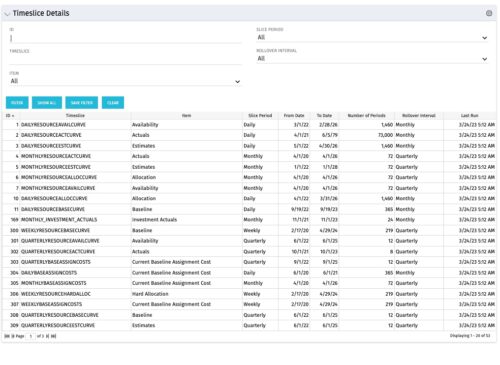 This allows users without admin access to see the timeslice settings and also allows the data to be exported to excel easily. Many organizations like to document their timeslice settings which is a manual process as you cannot export the timeslice page to excel. This allows them to periodically export the portlet results to excel to meet their documentation requirements.
 -
This allows users without admin access to see the timeslice settings and also allows the data to be exported to excel easily. Many organizations like to document their timeslice settings which is a manual process as you cannot export the timeslice page to excel. This allows them to periodically export the portlet results to excel to meet their documentation requirements.
-
This allows users without admin access to see the timeslice settings and also allows the data to be exported to excel easily. Many organizations like to document their timeslice settings which is a manual process as you cannot export the timeslice page to excel. This allows them to periodically export the portlet results to excel to meet their documentation requirements.
-
 Course description: “Does CA PPM Timeslice functionality seem like a foreign language to you? This intro to timeslices will cover an Overview of Timeslice Fundamentals, Terminology, Best Practices, Diagnostics, and the basic SQL Constructs to get you started.”
 -
 A .pdf file that has the slide by slide presentation at 2015 RegoU on basic administration of CA PPM. The agenda covers an administration overview, objects, lookups, OBS/Security, portlets, processes, and support items.
 -
 To help you stay ahead of the curve, we've asked our 250+ expert guides to share the key trends they've seen firsthand while working with our clients. The result? We are equipped to prepare you for what’s coming next. In this class, Rego’s senior strategists will reveal the top trending PPM / SPM themes and share practical insights to help your organization thrive. Learn what’s shaping the future of PPM / SPM and discover actionable strategies you can utilize right away.
 -
 A presentation slide deck from Rego University 2022. This course reviewed Adoption Metrics and Reliable Data Collection.
- Reliable Data Collection and Business Performance
- Adoption Metrics and Customer Adoption
- Data Quality, Data Integrity and Ensuring User Confidence
- Business Performance
- Reliable Data Collection and Business Performance
-
 Maximize the value of your training delivery by increasing end user engagement with the course content. Discuss options to optimize efficiency and help ensure users are engaged while participating in training.
 -
 Tight budgets or disbursed teams often necessitate virtual training delivery. Discuss best practices and strategies to increase the effectiveness of your virtual courses.


Copyright 2023 • Rego Consulting Corporation • Privacy Policy