-
 This training document is a Rego Consulting Quick Reference Guide to assist with accessing Project Financials in Clarity’s Modern User Experience.
 -
 A Quick Reference Guide to assist in the use of Clarity’s Roadmaps Board View. Shows how to go from the Roadmap List view to the Board View. Reviews functionality and use of the Board View.
 -
 Do you want to improve the success of your CA PPM projects? This class will discuss some lessons learned on making CA PPM projects more successful. We will discuss things like
- developing robust test plans, creating effective use and test cases, and implementing test scripts that make sense.
- why failures occur, and what you can do to minimize the impact and plan for success: case study in lessons learned.
- developing, testing, fine tuning, and executing deployment plans for success.
-
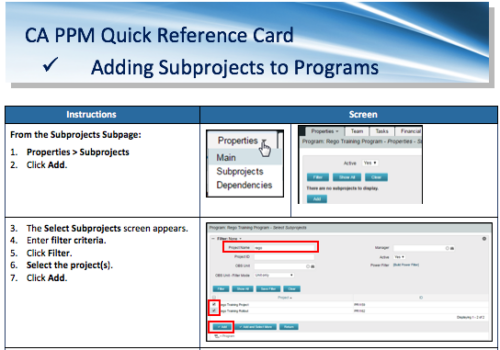 A Quick Reference Card to assist in the adding of Subprojects to Programs. Shows how add and remove from the Subprojects Subpage or from the Hierarchy Tab.
 -
 Does project and idea estimation take too long and lack visibility? This class will address one of the most common pain points within organizations: how to involve the right people within a timely project estimate. Learn some Rego best practices for defining, calculating, and modifying idea and project estimates, so you can increase throughput and ROI.
 -
 Do you want to know the best practices for implementing program management within CA PPM? More and more companies are moving to a form of program management, where projects may not be individually funded, but programs are funded instead. We will walk through how to leverage Clarity for program management, including use cases and what can and cannot be used OOTB.
 -
 Are you considering the use of CA PPM's benefits tracking for planned and/or realized benefits? This session will be a review of common use cases for putting benefits forecasts and realized benefits into CA PPM along with the reporting available out of the box and within RegoXchange.
 -
 Course Description: Are you tracking your vendor contracts outside of Clarity PPM? Have you considered moving the data into Clarity PPM? This session will review a set of use cases where Clarity PPM is being used to manage vendor contracts and how they are linked to resources, projects, and time to drive efficiencies in monitoring contracts and comparing actuals to invoices.
 -
 Do you want to understand the OOTB configuration and functionality of resource management? In this class, we will review the OOTB objects, views, and functions of assignments, allocations, and other related areas. We will cover both classic and new UX highlighting differences.
 -
 This training document is a Rego Consulting Quick Reference Guide to assist with the saving and managing of Roadmap views in Clarity’s Modern User Experience. This doc references version 16.1 views. Document provides detail on the Save As feature for Roadmap views. Detail is provided on views created by others, how to manage existing views and how to save them as favorites. Timeline, Board and Grid view saving options are detailed.
 -
 Uncertainty in the economy and the marketplace requires diligent, focused efforts to align the work you plan to deliver with your organization’s strategy and desired business outcomes. Using advanced SPM capabilities in Clarity, we will guide you through interactive exercises to build a hierarchical strategic plan, connect a portfolio of work items to that plan, and begin to visualize the intended flow of value in your portfolio. (Session 1 of 2) Finite limits on people and funding for work items, competing priorities, and ever-present volatility make it challenging to ensure we are investing in the right work, while also demonstrating that we have the necessary resources to deliver results successfully. Building on Session 1, we will continue with interactive exercises to perform constraint-based prioritization and scenario planning, defining our optimal portfolio of work to achieve our business strategy. Then we will explore how we can effectively visualize KPIs and health metrics to measure our performance and identify opportunities for improvement. (Session 2 of 2)
 -
 If your organization is adopting Objectives and Key Results (OKR) framework, this session is for you. Through a role play exercise you will learn how to spot and write some really solid OKRs.
 -
 Are you struggling with implementing Agile tools in your organization in addition to Clarity? This class will review best practices for implementing Agile tools in conjunction with Clarity - living in a Bi-Modal world. We will discuss how Clarity can be used to govern both types of work and teams and how Agile tools should interface into Clarity.
 -
 This training document is a Rego Consulting Quick Reference Guide to assist with the management of project Financials in Clarity’s Modern User Experience. This doc references version 16.2.1 views. Document includes summary information on the Financials module and provides detail on how to customize the grid and save views. Instructions are provided on how to filter data and how to use the ⋮ (vertical ellipses) icon to access further features. Detail is provided on the group by function, the column panel, the export of cost plan and editing cost plan and budget plan data from the grid.
 -
This training document is a Rego Consulting Quick Reference Guide to assist with the utilization of Tasks and To Do’s in Clarity’s Modern User Experience. This doc references version 16.2.1 views. Document references the Tasks and To Do’s menu items and their associated widgets.
-
 This training document is a Rego Consulting Quick Reference Guide to assist in the replacement of roles with named resources in Clarity’s Modern User Experience. This doc references version 16.1.2 views. Document provides detail on soft bookings, default allocation and requested manager. Instructions are provided on how to access requests from the Staffing Plan view and how to swap the role for a named resource. If requests are not fulfilled in their entirety, details are provided on how the excess allocation is handled.
 -
 This training document is a Rego Consulting Quick Reference Guide to assist with creation and management of resource Teams in Clarity’s Modern User Experience. This doc references version 16.1.2 views. Document provides detail on how to create Teams and add resources to a Team. Instructions are provided on how to add resources by OBS and how to allocate a team to an investment. Team key points are provided with regard to Classic, Allocations, ETC and Financials.
 -
 This training document is a Rego Consulting Quick Reference Guide to assist with the creation and use of Widgets in Clarity’s Modern User Experience. It covers the 5 types: Number Tile, Pie, Bar, Progress Ring, and Target. This doc references version 16.1.2 views.
 -
 Do you have a basic understanding of GEL scripts but need to a better understanding of how they work? This class will teach you how to XOG data in and out of objects in GEL as well as perform basic emails inside GEL.
 -
 This training document is a Rego Consulting Quick Reference Guide to assist with the Staffing Plan. The document reviews accessing the Staffing Page, viewing Resource Allocations, adding Allocations, and the Staff Tab Legend.
 -
 This training document is a Rego Consulting Quick Reference Guide to assist with the process of staffing a Team in Clarity’s Modern User Experience. The document starts with a review of common terms, then setting default allocation, Allocation vs ETC, and then the Staffing Tab.
 -
 This training document is a Rego Consulting Quick Reference Guide to assist with Task management under the Task Tab in Clarity’s Modern User Experience. Document reviews the three task views available: Timeline view, Board view and Grid view.
 -
 This training document is a Rego Consulting Quick Reference Guide to assist with the adding of URL links and use of the conversation functionality in Clarity’s Modern User Experience.


Copyright 2023 • Rego Consulting Corporation • Privacy Policy