-
 Canada Life shares their Clarity Implementation experience, and the lessons learned from the process.
 -
 Did you stray from OOTB? Was that the right decision? This will be a discussion on pros and cons of sticking to Clarity’s stock attributes, views, and general capabilities. When does it make sense to avoid custom configuration? Conversely, when does it make sense to move beyond the standard OOTB setup?
 -
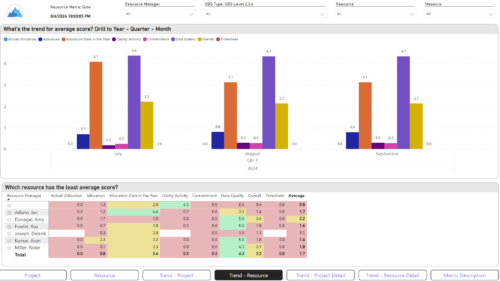
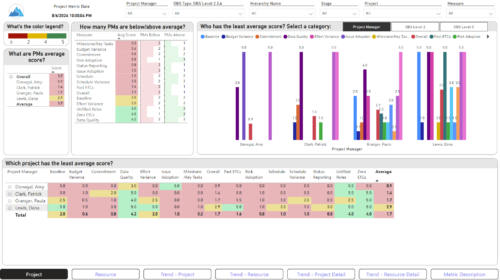 The Adoption Dashboard is designed to enhance data integrity and project tracking within Clarity by providing insights into how well users are populating and managing their project and resource data. Features: · Project Data Quality Evaluate the accuracy of project status reporting, risk, issue tracking, and schedule adherence. · Resource Data Quality Assess how well resource managers are managing timesheets, allocations, and actual utilization. · Adoption Scoring View Rate the consistency of data entry across projects and resources on a scale of 0-5, helping identify areas needing improvement. · Variance Analysis View Track discrepancies in project schedules, effort, budgets, and resource commitments. · Compliance Monitoring Ensure that all necessary project and resource data is up-to-date, aiding in more informed decision-making and better project outcomes.
 -
 A Quick Reference Guide to assist in the administrative process of updating an OBS in Clarity. An Organizational Breakdown Structure (OBS) is a hierarchical structure you can use to align resources, projects and investments. Note: the following steps apply when updating a non-financial OBS. The financial OBS (Department and Location OBS) are generally setup as part ofthe Clarity implementation.
 -
A Quick Reference Guide to assist in the administrative process of updating an Attribute Color in Clarity. The display mappings of an attribute can be configured to indicate a range of values or specific values using colors.
-
A Quick Reference Guide to assist in the administrative process of populating a Rate Matrix in Clarity. A rate matrix is used during cost plan population and financial transaction processing to determine costs and rates. You can create cost and rate matrices for labor, materials, equipment, and expense resources.
-
A Quick Reference Guide to assist in the administrative process of creating a new Clarity OBS. An Organizational Breakdown Structure (OBS) is a hierarchical structure that can be used to align resources, projects and investments. An OBS can be used for reporting and access control based on OBS membership. Note: the following steps apply when creating a non-financial OBS. The financial OBS (Department and Location OBS) are generally setup as part of the Clarity implementation.
-
A Quick Reference Guide to assist in the administrative process of adding an attribute to a Clarity object. Attributes store information associated with object views. For example, Start and Finish are a Date type attributes and Project Type is a lookup type attribute on the Project object.
-
A Quick Reference Guide to assist in the administrative process of creating a new Group in Clarity. A group is a collection of users that require the same set of access rights. Access rights are generally granted to groups (and not directly to users).
-
A Quick Reference Guide to assist in the administrative process of creating a new Clarity Blueprint. An applications administrator can use blueprints to configure different layouts for different types of projects, ideas or investments.
-
A Quick Reference Guide to assist in the process of adding Sections and Attributes to a Clarity Blueprint. User must have access to the Administration Module.
-
A Quick Reference Guide to assist in adding Modules to a Clarity Blueprint. User must have access to the Administration Module.
-
A Quick Reference Guide to assist in the use of the Attribute Grid in Clarity’s Modern User Experience Admin Menu. The Attributes grid under MUX Administration menu allows you to perform the following actions on attributes: 1. Define field level security (FLS) 2. Create labels 3. Create tool tips 4. Define display type
-
A Quick Reference Guide to assist in the process of associating an OBS with User Access in Clarity’s Modern User Experience. An Organizational Breakdown Structure (OBS) can be used for user access control. Perform these steps if the OBS is required for managing access rights for objects such as resources and investments. Note: the following steps apply to non-financial OBSs and the OBS must exist in the system.
-
A Quick Reference Guide to assist in the process of adding Rights to a Group in Clarity’s Modern User Experience. A group is a collection of users that require the same set of access rights. Access rights (Global, OBS, Instance) can be added to a group.
-
A Quick Reference Guide to assist in the process of adding members to a Group in Clarity’s Modern User Experience. A group is a collection of users that require the same set of access rights. Members (users) can be added to a group.
-
A Quick Reference Guide to assist in the creation of Action Items in Clarity’s Modern User Experience. The Action Items tile in Administration serves as a way to create Action Items in MUX without having to use Classic and create processes. Administrators can use the Action Items to create, update, and delete Action Items that can be triggered through Business Rules.
-
This training document is a Rego Consulting Quick Reference Guide to assist with the management of the Grid View within Hierarchies in Clarity’s Modern User Experience. This doc references version 16.2.1 views. Document covers information on how to export to CSV, filter, create and save Views, use of the Column Panel and the Details panel.


Copyright 2023 • Rego Consulting Corporation • Privacy Policy