-
 Part of the Business Transformation Content collection, this bar chart portlet displays count of ideas per business unit. This provides a holistic view of the idea pipe-line in an organization providing them a high-level of ideas converted, approved, unapproved per business unit.
 -
Part of the Business Transformation Content collection, this bar chart portlet displays count of ideas per business unit. This provides a holistic view of the idea pipe-line in an organization providing them a high-level of ideas converted, approved, unapproved per business unit.
-
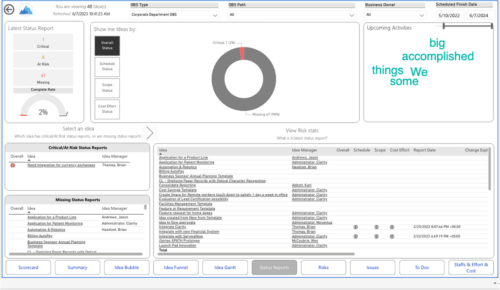
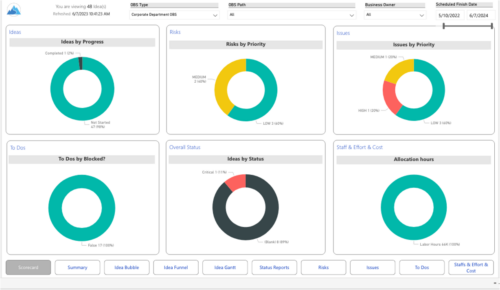 Master your pipeline as you prioritize, visualize, and analyze ideas, assess their feasibility, and track progress from inception to execution. Report Views include:
- Idea Bubble
- Idea Details
- Idea Funnel
- Idea Gantt
- Idea Overview
- Idea Staff and Effort
- Idea Status
- Idea To Dos
-
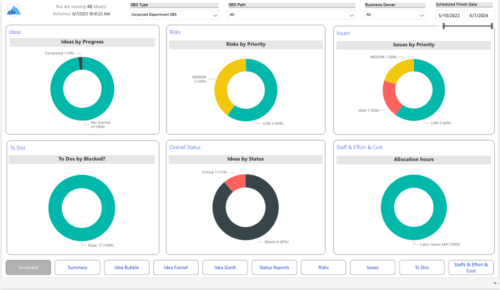 Master your pipeline as you prioritize, visualize, and analyze ideas, assess their feasibility, and track progress from inception to execution. Report Views include: • Idea Bubble • Idea Details • Idea Funnel • Idea Gantt • Idea Overview • Idea Staff and Effort • Idea Status • Idea To Dos Demo Video - https://www.youtube.com/watch?v=xPSxOlrqEq8&list=PLXJ5ktuWV0jiS9CvBpHvBIwpKPmA9uvwK&index=3 The main .rpt file will access data through the Data Warehouse. For clients on Rego’s AWS hosting, we have versions that work with Oracle and Postgres DB and access the live database, if the Rego Odata connector is being used.
 -
 Part of the Business Transformation collection, this grid portlet displays idea details for all ideas (active and inactive) and all status conditions. This is an editable portlet based on the Ideas data provider. Filterable by OBS structure, Active/Inactive, and Status.
 -
Part of the Business Transformation collection, this grid portlet displays idea details for all ideas (active and inactive) and all status conditions. This is an editable portlet based on the Ideas data provider. Filterable by OBS structure, Active/Inactive, and Status.
-
Part of the Business Transformation collection, this grid portlet displays idea details for all ideas (active and inactive) and all status conditions. This is an editable portlet based on the Ideas data provider. Filterable by OBS structure, Active/Inactive, and Status.
-
 A Quick Reference Guide to assist in the creation of Financial Plans for Ideas in Clarity’s Modern UX. In Modern UX you can only create Manual Financial Plans. Go to Classic if you want to create a Cost Plan from Investment Team a Budget Plan or Benefit Plan.
 -
 This training document is a Rego Consulting Quick Reference Guide to assist with setting up financial plans for ideas in Clarity’s Modern User Experience. The document reviews Ideas Cost Plans and Idea Budget Plans.
 -
 Course Description: Have you ever wanted to build portlets that were not limited by Clarity PPM's out-of-the-box portlet types? This class will explore some of the options you can use to build helpful portlets with HTML, including calendars, Kanban boards, tile-based project lists, and some special Star Wars-themed communication portlets.
 -
 A presentation slide deck from Rego University 2022. Broadcom’s presentation on VSM and how the use of ValueOps drives innovation.
- The Challenge of Digital Transformation
- Why Value Stream Management?
- How ValueOps Drives Innovation & Digital Transformation
-
 If your organization is adopting Objectives and Key Results (OKR) framework, this session is for you. Through a role play exercise you will learn how to spot and write some really solid OKRs.


Copyright 2023 • Rego Consulting Corporation • Privacy Policy