-
 A presentation slide deck from RegoU 2023. This course reviewed the abundant ways to document information within Apptio.
 -
 Set yourself up for success in IT planning by learning the ins and outs of Apptio's ITP. We will cover tips and tricks, best practices, and ways to use ITP to push your organization to the next level.
 -
 A presentation slide deck from Rego University 2022. This class reviewed Apptio reporting options, tips & tricks, etc.
- Introduction
- Reporting Options for Apptio
- Reporting Tips & Tricks
- Reporting best practices
- Custom Report Showcase
-
 Reporting is typically the only interaction executives, and stakeholders have with Apptio, so reports should be pristine. In this session, we will show you how to improve your Apptio reporting, making it more visually appealing, intuitive, and digestible. We'll give you some tips on how to make your reporting in Apptio pop out like conditional highlighting, leveraging html components, layout and design techniques.
 -
 A presentation slide deck from Rego University 2022. An outline of topics used for a Apptio Round-Table discussion.
 -
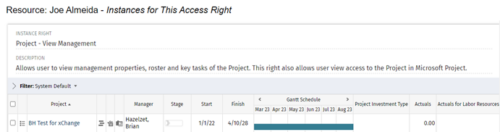
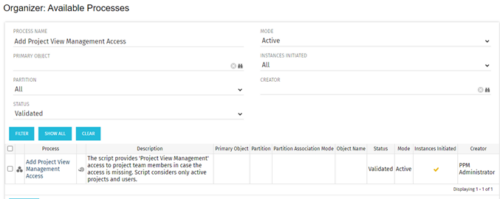 This process grants Project Management instance rights to all of the project team members within the program hierarchy. Allows users to view management properties, roster and key tasks of the project. This also allows user view access to the project in Microsoft Project.
 -
This process grants Project Management instance rights to all of the project team members within the program hierarchy. Allows users to view management properties, roster and key tasks of the project. This also allows user view access to the project in Microsoft Project.
-
This process grants Project Management instance rights to all of the project team members within the program hierarchy. Allows users to view management properties, roster and key tasks of the project. This also allows user view access to the project in Microsoft Project.
-
 Part of the Business Transformation collection, this bar-chart portlet displays investments and (if exists) any child investments, which are at risk with regard to the schedule of the investments.
 -
Part of the Business Transformation collection, this bar-chart portlet displays investments and (if exists) any child investments, which are at risk with regard to the schedule of the investments.
-
 Discover how to utilize Datalink and its expanding range of system integration connectors to automate data processing and streamline your TBM processes. This session will cover tips and tricks for efficient month-end processing, testing, and validation, as well as delve into the use of Datadrop, integration with ITP, and API implementation. Enhance your TBM experience by mastering automation and streamlining techniques.
 -
 Has your organization made significant investments in technology solutions without seeing precise results? Do you have the right capabilities yet lack a vibrant and interconnected end-to-end solution? Come to this session to learn more about the importance of a living strategic roadmap and how Rego's Digital Ecosystem Assessment program can help. This session will review the key elements needed to create an effective roadmap that can help optimize your digital ecosystem, drive increased maturity, and increase engagement within your organization.
 -
 Looking to automate some tasks within your Clarity environment? This class will guide you through Clarity's workflow engine, covering instance vs. general processes, start options, action types, pre and post conditions, MUX workflows, and notifications.
 -
 This course will introduce fundamental programming concepts like variable assignment, conditional statements, and loops. The class will be taught in GEL and will build a solid foundation for future programming skills.
 -
 This introductory course will teach students how to query the Clarity database using SQL. We will discuss different methods to query the database, the basics of SQL, and the Clarity data model.
 -
 This training document is a Rego Consulting Quick Reference Guide to assist with the creation of Benefit Plans in Clarity’s Modern User Experience. The document reviews the process to create a benefit plan and then add it to a cost plan.
 -
 A presentation slide deck from Rego University 2022. This course reviews the new release features in ApptioOne.
- Where to find new releases
- Apptio BI
- ApptioOne
- Editable Tables
-
 Do you want to understand Best Practice of configuration and functionality for demand management? In this class, we will review the OOTB objects, views, and functions of demand management.
 -
 Do you want to understand the OOTB configuration and functionality of financial management? In this class, we will review the OOTB objects, views, views, and functions of financial plans, rates, and other related areas. We will cover both newUX gaps from classic. We will discuss best practices.
 -
 Do you want to understand the OOTB configuration and functionality of financial management? In this class, we will review the OOTB objects, views, views, and functions of financial plans, rates, and other related areas.
 -
 Do you want to understand Clarity's configuration and functionality for financial management? In this class, you will learn about the OOTB objects, views, and functions of financial plans, rates, and other related areas.
 -
 Do you want to understand Clarity's best practices for configuration and functionality in demand management? In this class, you will learn about the OOTB objects, views, and functions of Ideas, along with tips and tricks to support your demand management processes.
 -
 Do you want to understand Best Practice of configuration and functionality for demand management? In this class, we will review the OOTB objects, views, and functions of Ideas, along with tips and tricks to support your Demand Management processes.
 -
 This session will aligning you with some of the best and most common practices for using Clarity's Project Management capabilities. Come and learn about the capabilities that come out of the box for excellent project management. Things like objects, views, financial plans and general project management capabilities will be covered. Additionally, tips and tricks will be discussed leaving you with a toolkit of ideas.


Copyright 2023 • Rego Consulting Corporation • Privacy Policy