-
 A Quick Reference Guide to assist in the administrative process of creating a new Group in Clarity. A group is a collection of users that require the same set of access rights. Access rights are generally granted to groups (and not directly to users).
 -
A Quick Reference Guide to assist in the administrative process of creating a new Clarity Blueprint. An applications administrator can use blueprints to configure different layouts for different types of projects, ideas or investments.
-
A Quick Reference Guide to assist in the process of adding members to a Group in Clarity’s Modern User Experience. A group is a collection of users that require the same set of access rights. Members (users) can be added to a group.
-
 This training document is a Rego Consulting Quick Reference Guide to assist with the management of Budget Plans in Clarity’s Modern User Experience. This doc references version 16.1.2 views. Doc provides detail on how to submit a cost plan for approval, how to approve or reject submitted budgets and also provides additional detail on the rules that apply to the submission of budget plans.
 -
 Broadcom recently introduced “Cooking with Clarity” a step-by-step guide to deploying and configuring Clarity. This session focuses on how to integrate Clarity and Rally.
 -
 The CA Clarity Hidden Page WSDL document provides an overview of how to access the system documentation page for you CA Clarity application from the web.
 -
 For each process, the Process Run Metrics portlet shows the Process Name, Process Code, Description, # Running, # Completed, # Errored, and Last Run Date. This portlet is ideal for system administrators and support staff needing to monitor the health of the environment. Viewers of this portlet can get a sense of the complexity & health of the environment with the # of processes running and visibility into processes that errored out. The table below describes the available filter fields in the portlet.
Column Label Description Process Name Name of the process Start Date Start date of the process’s last ran date End Date End date of the process’s last ran date Description Description of the process Process ID ID of the process -
 A Quick Reference Guide to assist in the process of creating a table in a Jaspersoft Ad-Hoc Report. Uses screenshots to walk you through the process.
 -
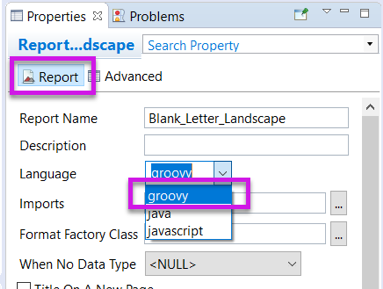 Changing the report programming language can allow the report developer to use other languages (such as Groovy or Javascript) instead of Java methods in expressions. This can be useful in debugging report code.
 -
 This training document is a Rego Consulting Quick Reference Guide to assist with the creation of Hierarchies in Clarity’s Modern User Experience. This doc references version 16.0.3 views. Document provides information on how to import investments and how to create child / parent relationships. Detail is provided with regard to the export of Hierarchies to PDF format.
 -
 This training document is a Rego Consulting Quick Reference Guide to assist with the management of the Card View within Hierarchies in Clarity’s Modern User Experience. This doc references version 16.0.3 views. Document provides detail on View Options, Color By, Card Fields and Card Metrics. Information on how to roll up metrics via an aggregation or calculation method.
 -
 This training document is a Rego Consulting Quick Reference Guide to assist with Financial Actuals and Reporting in Clarity’s Modern User Experience. This doc references version 16.0.3 views. Document includes detail on which jobs should be run to ensure project and financial data is synchronized with the latest posted actuals. Information is provided on how to analyze cost plans and how to review actual transactions. Instructions are provided on how to analyze budget plans.


Copyright 2023 • Rego Consulting Corporation • Privacy Policy