-
 Course description: “Is there a way to simplify time tracking? Time is a function 90% of companies use. What are ways to have time be less of a burden to users? How can you minimize the negative perception? This session will discuss options within CA PPM or outside CA PPM to make time tracking less of a burden for all.” Download file is the presentation slide deck.
 -
 Course description: “Are some of your users leveraging a Smartsheet add-on for project planning, or are you looking for an alternative to OWB and MSP? Learn how this new scheduling tool is making waves and adding value for project managers working within CA PPM.” Download file is the presentation slidedeck.
 -
 Uncertainty in the economy and the marketplace requires diligent, focused efforts to align the work you plan to deliver with your organization’s strategy and desired business outcomes. Using advanced SPM capabilities in Clarity, we will guide you through interactive exercises to build a hierarchical strategic plan, connect a portfolio of work items to that plan, and begin to visualize the intended flow of value in your portfolio. (Session 1 of 2) Finite limits on people and funding for work items, competing priorities, and ever-present volatility make it challenging to ensure we are investing in the right work, while also demonstrating that we have the necessary resources to deliver results successfully. Building on Session 1, we will continue with interactive exercises to perform constraint-based prioritization and scenario planning, defining our optimal portfolio of work to achieve our business strategy. Then we will explore how we can effectively visualize KPIs and health metrics to measure our performance and identify opportunities for improvement. (Session 2 of 2)
 -
 Join us for a round table discussion on advanced SQL. We'll discuss sub-queries, common table expressions (CTE's), analytic functions, and any other requested topics. With multiple instructors we can break out into smaller groups for a more targeted experience.
 -
 Are your reports and portlets performing well? This class will walk through specific SQL tuning tricks to make queries run faster, increase end-user satisfaction, and smooth-out system performance. This is an easy way to promote efficient future development and make a huge, positive impact on user experience.
 -
 A Quick Reference Guide to assist in the process of staffing a Project Team in Clarity. The document uses screen shots from the Classic UX with the Phoenix theme.
 -
 A Quick Reference Guide to assist in the staffing of a resource team in Clarity’s Classic UI, utilizing the Phoenix Theme. Reviews accessing the project and assigning the team.
 -
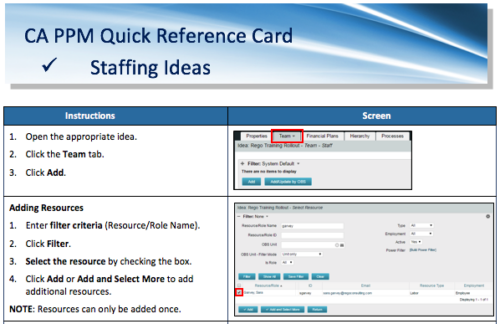 A Quick Reference Card to assist in adding resources and roles to Ideas in the Classic UX. Updating Allocation is also covered.
 -
 This training document is a Rego Consulting Quick Reference Guide to assist with the Staffing Plan. The document reviews accessing the Staffing Page, viewing Resource Allocations, adding Allocations, and the Staff Tab Legend.
 -
 This training document is a Rego Consulting Quick Reference Guide to assist with resource staffing in Clarity’s Modern User Experience. The document reviews accessing Staffing from the main menu, the Staffing Grid, and the Allocations Timeline.
 -
 This training document is a Rego Consulting Quick Reference Guide to assist with staffing the Idea Team in Clarity’s Modern User Experience.
 -
 A Quick Reference Guide to assist in the staffing of an Idea in Clarity’s Classic UX.
 -
 A Quick Reference Guide to assist in Staffing an Idea Team in Clarity. The document uses the Classic UX with the Phoenix theme.
 -
 A Quick Reference Guide that covers how to staff a Team in Clarity’s Modern UX. It reviewes some of the key terminology, covers Allocation vs. ETC, accessing the Staffing Tab, and viewing time-scaled allocations.
 -
 This training document is a Rego Consulting Quick Reference Guide to assist with the process of staffing a Team in Clarity’s Modern User Experience. The document starts with a review of common terms, then setting default allocation, Allocation vs ETC, and then the Staffing Tab.
 -
 Course Description: How do companies track stage gates within Clarity PPM? This session will review some best practices for tracking, monitoring, and approving stage gates within Clarity PPM. We will also discuss pros and cons of various options to help you select the best method for your company.
 -
 Course description: “People are the #1 key to successful implementation, acceptance and sustaining adoption after the project is long gone. Find out some tips and tricks on how to keep those key stakeholders engaged.” Download file is the presentation slide deck.
 -
 Course Description: People are the #1 key to successful implementation, acceptance, and sustaining adoption after the project is long gone. Learn some tips and tricks on how to keep key stakeholders engaged.
 -
 This training document is a Rego Consulting Quick Reference Guide to assist with Status Reporting in Clarity’s Modern User Experience. The document reviews Status Reporting via the Status Tab and the Status Reporting Tab – Grid View.
 -
 A Quick Reference Guide to assist in the creation and management of Status Reports in Clarity’s Modern UX. Reviews accessing the project details from the grid or tile view, creation of a new status report, existing status reports in Classic, updating status reports, customizing project status, and the project status list view.
 -
 A presentation slide deck from Rego University 2022. This course reviewed the importance of user feedback on the use of the tool.
- What is Feedback?
- Why is Feedback Important?
- Audience Participation
- Group Discussion
- Methods of Collecting Feedback
- Case Studies
- Staying Connected to Your Users
-
 Course description: “How do you close the feedback loop with your users? This session will review some innovative ways companies are connecting with CA PPM users to drive constant innovation and improve perception of the process and tool.” Download file is the presentation slide deck.
 -
 In today's business world, there are many threats to our ability to remain focused and productive. In this session we'll borrow learnings from sources like the best-selling book "Atomic Habits," other renowned thought leaders, and even from the worlds of sports, yoga, and meditation. We will discuss and practice some tools and methods you can begin using right away to improve your productivity while maintaining your own wellbeing and balance.
 -
 This session dives into the impact of misaligned data between planning and delivery systems—and what it costs your organization in rework, delays, and missed opportunities. Learn how connecting Clarity and Jira enables real-time synchronization between portfolio planning and Agile execution, giving CIOs the visibility, traceability, and confidence to drive outcomes—not just activity.


Copyright 2023 • Rego Consulting Corporation • Privacy Policy