-
 A Quick Reference Guide to assist in the administrative process of creating a new Clarity Blueprint. An applications administrator can use blueprints to configure different layouts for different types of projects, ideas or investments.
 -
A Quick Reference Guide to assist in the process of adding members to a Group in Clarity’s Modern User Experience. A group is a collection of users that require the same set of access rights. Members (users) can be added to a group.
-
 This training document is a Rego Consulting Quick Reference Guide to assist with the management of Budget Plans in Clarity’s Modern User Experience. This doc references version 16.1.2 views. Doc provides detail on how to submit a cost plan for approval, how to approve or reject submitted budgets and also provides additional detail on the rules that apply to the submission of budget plans.
 -
 This training document is a Rego Consulting Quick Reference Guide to assist resource managers with the adjusting of timesheets. This doc references version 16.1.2 views. Document provides guidance on how to use the Review & Approve tab to adjust time that has already been entered by a resource.
 -
 A presentation slide deck from RegoU 2023. This course discussed how IBM’s Turbonomic and Apptio’s Cloudability can work together. Using these two tools will empower your FinOps Organization.
 -
 A presentation slide deck from RegoU 2023. This course covered existing Clarity customers sharing what they do well in their implementation of Clarity. Customers were Tyson, HCSC, and Erie Insurance.
 -
 A presentation slide deck from RegoU 2023. This course covered innovation items that Rego has created to enhance the usability for Apptio.
 -
 Discover how ApptioOne and Targetprocess seamlessly integrate to combine financial and agile processes, creating a unified approach to managing your organization's technology investments. This session will explore the benefits of leveraging both tools to optimize financial management and enhance agile project delivery. Learn how to harness the power of ApptioOne and Targetprocess together to drive efficiency and achieve your organization's goals.
 -
 Broadcom recently introduced “Cooking with Clarity” a step-by-step guide to deploying and configuring Clarity. This session focuses on how to integrate Clarity and Rally.
 -
 Discover best practices for managing complex Apptio architectures, including custom use cases, key decision points for working within CT projects or creating custom projects, and the importance of focusing on the data layer and model. Gain insights from valuable lessons learned and develop a robust production release strategy that encompasses calculation times, check-ins, rollbacks, and automation. This session will equip you with the knowledge and skills to optimize your Apptio environment and navigate complex architectures with confidence.
 -
 Discover the benefits and functionality of Editable Tables in Apptio and how they can be leveraged to simplify and streamline Technology Business Management (TBM) processes. This session will delve into the new features and capabilities of Editable Tables, demonstrating unique methods for making your TBM experience more efficient and manageable. Expand your knowledge and master the art of Editable Tables and Reports in Apptio.
 -
 In the session we will examine the synergy between Apptio and finance applications such as Anaplan, Oracle EPMCS, OneStream, and ClearCost. Discover how Apptio, with its purpose-built IT focus, can enhance organizational planning and workforce management by integrating with finance apps. Join us to learn valuable talking points for TBM Directors and explore real-world examples of successful collaboration between finance apps and Apptio.
 -
 In this session we will explore complex cloud use cases you can manage within ApptioOne, including accruals, forecasting, multi-cloud chargeback, RI waste analysis, and reallocations. Additionally, we will discuss Cloud Business Management reporting and its role in driving accountability, optimizing cloud spend, and creating custom reports for various roles. Join us to learn how ApptioOne can empower you to navigate today's multi-cloud environments and enhance your cloud management strategy.
 -
 Tool adoption can struggle if the user experience is too complex or confusing. In this session, we will explore ways to set up your Apptio space to best suit your user base. Learn how to optimize each user's experience with Apptio through security, customizations, and reporting.
 -
 Many organizations have a goal to understand, track, and control the TCO of applications or services, but it can be challenging to accomplish. In this session, we'll discuss what makes TCO so important, important decisions you'll need to consider along the way, and some best practice guidance on reaching your TCO goal.
 -
 Discover the growing trend of organizations adopting the FinOps methodology and its integration with the TBM framework. In this session, we'll explore how the TBM office and FinOps teams can collaborate effectively to achieve desired outcomes, fostering a synergistic relationship between them, and leveraging the combined capabilities of Apptio and Cloudability for optimal results.
 -
 The leadership of your organization plays a vital role in the success of your Agile transformation. It is not always known or understood what role and what specific activities and behaviors are needed by leadership. In this session you will gain some guidance on how to appropriately get your senior leaders on board and ensure they are positioned to support the Agile journey in the most effective manner
 -
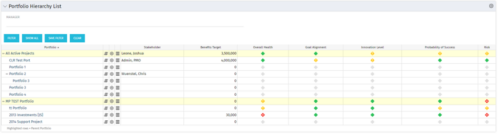 Part of the Business Transformation Package, this portlet displays the portfolios with hierarchy (child portfolio(s)). The portlet displays the basic portfolio fields like – manager, stakeholder, etc. A Metrics subpage can be created with the fields on the “Properties – Metrics.”. The fields: Overall Health, Goal Alignment, Innovation Level, Probability of Success are custom fields and can be configured on a subpage.
 -
Part of the Business Transformation Package, this portlet displays the portfolios with hierarchy (child portfolio(s)). The portlet displays the basic portfolio fields like – manager, stakeholder, etc. A Metrics subpage can be created with the fields on the “Properties – Metrics.”. The fields: Overall Health, Goal Alignment, Innovation Level, Probability of Success are custom fields and can be configured on a subpage.
-
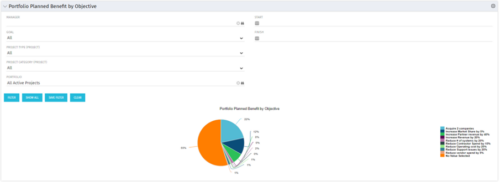 Part of the Business Transformation collection, this pie chart portlet displays realized benefit, grouped by category for portfolio investments. It uses System Provider: Portfolio Investment Provider.
 -
 Part of the Business Transformation Content collection, this bar chart portlet displays count of ideas per business unit. This provides a holistic view of the idea pipe-line in an organization providing them a high-level of ideas converted, approved, unapproved per business unit.
 -
 A Quick Reference Guide to assist in entering financial transactions into Clarity’s Classic UX. The guide reviews the basics of transactions entry, create voucher header, entering the line item - details, and entering the line item - transaction.
 -
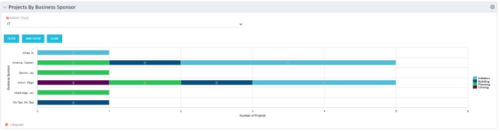 Horizontal Bar Graph displays total number of projects for each Business Owner/Sponsor for a selected Project Parent Stage (only Project Investments included). Vertical Axis displays Business Owner name. Horizontal Axis displays number of projects. Filter selectable for any Project Parent Stage. Color coding of bar and legend are synchronized to detail stage under the parent. Total for each detail stage displays on each segment of the bar. A mouseover displays a percent of total for each detail stage.
 -
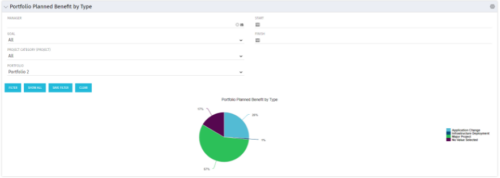 Part of the Business Transformation collection, this pie chart portlet displays realized benefit, grouped by type of project, for portfolio investments. It uses System Provider: Portfolio Investment Provider.
 -
 A Quick Reference Guide to assist in the process of creating a table in a Jaspersoft Ad-Hoc Report. Uses screenshots to walk you through the process.
 -
 Part of the Business Transformation collection, this grid portlet displays idea details for all ideas (active and inactive) and all status conditions. This is an editable portlet based on the Ideas data provider. Filterable by OBS structure, Active/Inactive, and Status.
 -
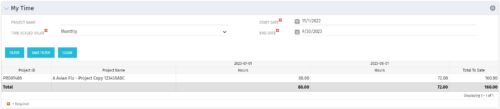 The My Time portlet provides the logged in user with the ability to view his or her time by project by time period without having to go into each period individually on the Timesheets page. This portlet uses the actual timeslices to retrieve data. It displays the amount of time worked per week, month or quarter on projects. The user may specify the dates, time-scaled value and the project name. The portlet also provides a Total to Date, which shows the total number of actuals for that resource on that assignment.
 -
The My Time portlet provides the logged in user with the ability to view his or her time by project by time period without having to go into each period individually on the Timesheets page. This portlet uses the actual timeslices to retrieve data. It displays the amount of time worked per week, month or quarter on projects. The user may specify the dates, time-scaled value and the project name. The portlet also provides a Total to Date, which shows the total number of actuals for that resource on that assignment.
-
 This training document is a Rego Consulting Quick Reference Guide to assist with the creation of Hierarchies in Clarity’s Modern User Experience. This doc references version 16.0.3 views. Document provides information on how to import investments and how to create child / parent relationships. Detail is provided with regard to the export of Hierarchies to PDF format.
 -
 This training document is a Rego Consulting Quick Reference Guide to assist with the management of the Card View within Hierarchies in Clarity’s Modern User Experience. This doc references version 16.0.3 views. Document provides detail on View Options, Color By, Card Fields and Card Metrics. Information on how to roll up metrics via an aggregation or calculation method.
 -
 This training document is a Rego Consulting Quick Reference Guide to assist with Financial Actuals and Reporting in Clarity’s Modern User Experience. This doc references version 16.0.3 views. Document includes detail on which jobs should be run to ensure project and financial data is synchronized with the latest posted actuals. Information is provided on how to analyze cost plans and how to review actual transactions. Instructions are provided on how to analyze budget plans.
 -
 This training document is a Rego Consulting Quick Reference Guide to assist with the management of Budget Plans in Clarity’s Modern User Experience. This doc references version 16.0.3 views. Doc provides detail on how to submit a cost plan for approval, how to approve or reject submitted budgets and also provides additional detail on the rules that apply to the submission of budget plans.
 -
 This training document is a Rego Consulting Quick Reference Guide to assist with the management of Roadmap items within the Grid View in Clarity’s Modern User Experience. This doc references version 16.0.3 views. Instructions are provided to help users add and remove columns, move columns, pin columns and sort rows of data. The document provides guidance on how to use the View Options function to manage Per-Period Metrics. Includes guidance on how to update Roadmap data from the Grid View and how to use the In Plan column to rank investments.
 -
 This training document is a Rego Consulting Quick Reference Guide to assist with Entering and Submitting Time in Clarity’s Modern User Experience. This doc references version 16.0.3 views. Document includes Accessing & Selecting Timesheets, Populate Timesheet, Updating Timesheet, Submitting Timesheet and Entering Time for Someone Else.
 -
 This training document is a Rego Consulting Quick Reference Guide to assist with General Navigation in Clarity’s Modern User Experience. This doc references version 16.0.3 views. Doc reviews the Menu Bar and User Tool Bar.
 -
 This training document is a Rego Consulting Quick Reference Guide to assist with the management of the Grid View within Hierarchies in Clarity’s Modern User Experience. This doc references version 16.0.2 views. Document covers information on how to export to CSV, filter, create and save Views, use of the Column Panel and the Details panel.


Copyright 2023 • Rego Consulting Corporation • Privacy Policy