
- Checking Apptio Version
- Tools Overview
- Configuration Tips
-
 A presentation slide deck from Rego University 2022. This class reviewed the importance of an application health check, optimization and tuning.
 -
 A presentation slide deck from Rego University 2022. A class on building a defensible cost model.
- Characteristics of a defensible model
- Steps to build an accurate TBM model
- Allocation best practices
-
 A presentation slide deck from Rego University 2022. This course taught an Agile approach to managing finances.
- IT Planning Essentials
- Common Practices & Challenges
- Leading IT Planning Approaches
- Continuous Planning vs Annual Planning
-
 A presentation slide deck from Rego University 2022. A course to improve your use of TBM Studio.
- References
- Managing builds
- Viewing your model and tracing data
- Using documentation options within TBM Studio
- Project Explorer Tricks
- Table Tricks
- Metric Tricks
-
 A presentation slide deck from Rego University 2022. A class about the goal of TCO and what it takes to achieve it.
- TCO Benefits
- Best Practices
- Deployment Tips
-
 A presentation slide deck from Rego University 2022. This course was about understanding TBM and positioning its value with your organization. • What is TBM • TBM Value • A TBM “Transformation” • TBM Value in Practice
 -
 A presentation slide deck from Rego University 2022. This course in the Apptio track was about analyzing cost drivers to understand why cost could be changing.
- Questions we’re looking to answer
- Scenarios
- Tools
-
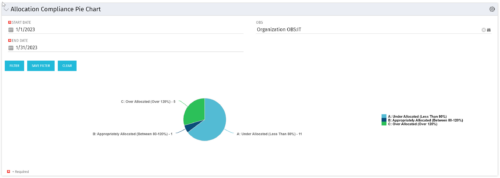 The Allocation Compliance Pie Chart portlet gives a view of active resources' allocation compliance within a date range and OBS displayed in a pie chart. It allows the user to the percentage of resources over, under, and adequately staffed on projects over a selected time period. This portlet leverages the daily allocation and daily availability slices as well as only active investments. The portlet provides filters for specific dates (required) and OBS.
 -
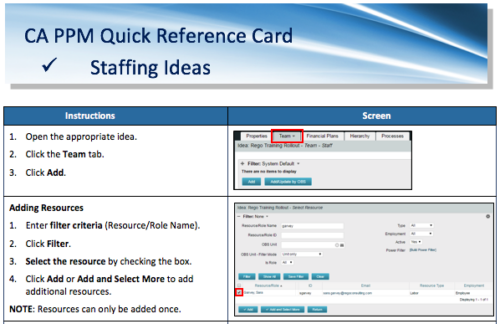 A Quick Reference Card to assist in adding resources and roles to Ideas in the Classic UX. Updating Allocation is also covered.
 -
 A Quick Reference Guide to assist in the staffing of an Idea in Clarity’s Classic UX.
 -
 A Quick Reference Guide to assist in the use of the Waterline to Optimize Portfolios in Clarity’s Classic UX. Reviews waterline menu, ranking rules, and use of filters.
 -
 This training document is a Rego Consulting Quick Reference Guide to assist with the use of the Staffing Plan in Clarity’s Modern User Experience. This doc references version 16.0.2 views. Document provides information on how to swap between views to see investments by resource or resources by investment. Instructions on filtering are provided, as well as detail on how to update the unit of measure between FTE (Full Time Equivalent) and Hours. Tips are provided on how to expand the list of investments within each view and how to view the properties for the allocations. A Legend is also documented to provide information on each of the icons that are displayed on this page.
