-
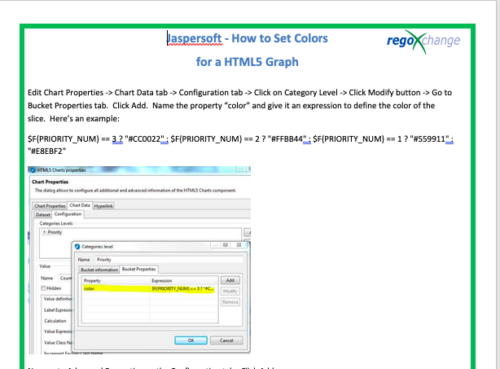 This tech-trick details the steps to set colors for an HTML5 Graph.
 -
 This tech-trick defines how to run a Jaspersoft report using Rest API
 -
 Many times Roles are spread out geographically or by function and these Roles will have different rates. For example, a developer in India may charge $25/hour vs a Developer in US may charge $50/hour. When the project team has a requirement of several developers, the PM will have to add a region specific role (Developer-US, Developer-India) so that the right rates can be applied when a cost plan is created. This creates a challenge in terms of Resource Management. As the Demand and Capacity can be spread between different region specific roles. Proper configuration on the Rate Matrix can allow you to have one Role name but different rates based on Location or Department. This allows greater flexibility and takes away the redundancy of Role Names. You can do so with the Project Team Member Properties.
 -
 Course Description: We once had a client refer to the reports they developed as “Fisher-Price” reports. Reports should be built with consistency using graphic design principles. Join a Rego architect and UX designer to learn some fundamental graphic design principles such as grid theory, ink-to-data ratio, flow, balance, and more. Come prepared to be "wowed."
 -
 If you work in a busy Project Management Office (PMO), then you know that good quality data is paramount to effective planning, decision making, and project delivery. You also know that sometimes a single data point can be enhanced when it is supplemented by additional information. But as an administrator or part of the PMO, how can you guide team members to ensure they enter meaningful data into your project management system? Clarity now offers the capability to create business rules which can enforce data-entry based on the way that other attributes have been updated. In this article, you’ll get step-by-step instructions on how to update your Clarity blueprints to utilize the new Conditional Required Modal.
 -
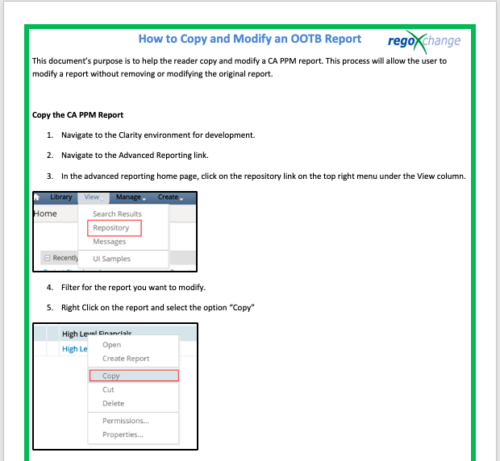 This document’s purpose is to help the reader copy and modify a CA PPM report. This process will allow the user to modify a report without removing or modifying the original report.
 -
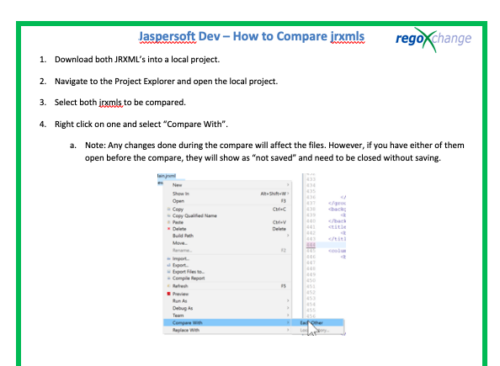 This document’s purpose is to help the reader compare jrxmls for Jaspersoft.
 -
 A .pdf file that has the slide by slide presentation at 2015 RegoU on how other companies are using CA PPM. The agenda covers an overview, definitions, business value, key requirements and best practices.
 -
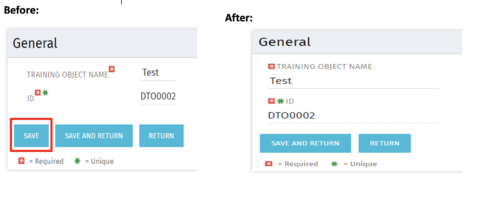 Often, you would want to disallow users from making edits to stay on the same page after changing the data by clicking Save. By forcing the users to click Save and Return, they are forced out of the page. For the above-mentioned reason, the Clarity admin can add the code in the attached tech-trick document, and that will hide the Save button from being displayed.
 -
 In this session you’ll hear about how Hershey’s is using Clarity and Rally to plan and manage their work in a hybrid project management environment. Some of the key capabilities used in both tools will be covered and you’ll hear about their integration approach.
 -
 Hershey shares their path to Power BI reporting. They discuss Power BI ways of working, Defining Executive Level Metrics, Design & Development, and Next Level Reporting.
 -
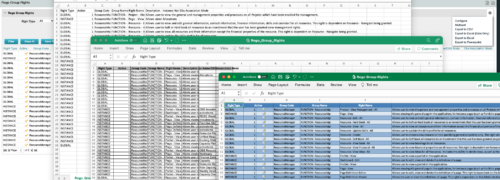
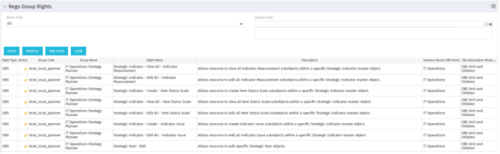 The Rego Group Rights portlet is a useful list view for functional administrators. It provides a flat view of all the Global, OBS and Instance rights that have been granted to all the groups in Clarity. It can be further filtered by just the rights type and/or the security group. It is also possible to export out to file in spreadsheet (csv, xlsx) or PowerPoint formats with OOB Clarity functionality.


Copyright 2023 • Rego Consulting Corporation • Privacy Policy