-
 Have you looked in the regoXchange or reviewed Rego’s innovation offerings? This class will show you the power of Rego’s pre-built content library, integrations, and other assets. See example after example of portlets, processes, and materials you can use to add value to your instance of Clarity. Learn how you can introduce email-based approvals with Rego's action item responder. Get a peek at Rego's new MSP integration that avoids the issues faced with the OOTB integration. Finally, understand Rego's pre-built connectors and how they can benefit your instance. Including blueprint migrator. Include free tools like GEL builder, query, XOGbridge.
 -
 This training document is a Rego Consulting Quick Reference Guide to assist with the creation of Status Reports in Clarity’s Modern User Experience. This doc references version 16.1 views. Document covers the creation of Status Reports via the Status Module as well as the Status Report Module. Detail is provided on the widgets that can be used within the Status Report canvas as well as instructions on how to configure the canvas. Detail is also provided on how to Preview and Publish status reports.
 -
 A presentation slide deck from Rego University 2022. This document is the course material for the Clarity Advanced Admin class.
- Introduction
- Objects, Attributes and Views/Fields
- Studio and Modern UX
- Introduction to SQL
- Lookups, Queries and Portlets
- Introduction to Workflows (Processes)
- XOG (XML Open Gateway)
- REST API
-
 The Auto-Approve Old Timesheets workflow process can be run through the "Execute a Process" job and may be used to quickly close out timesheets for a specified timeframe for period closure. The workflow will execute a query that will automatically approve ALL (no matter the status of the timesheet) timesheets that have a time period start date before the Approve Date specified within the process itself.
 -
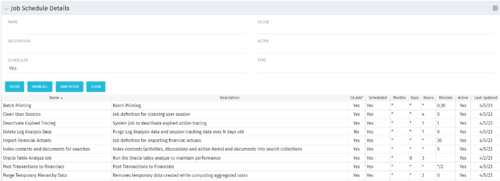 The Job Schedule Details portlet shows al jobs and displays all of the scheduled and non-scheduled information for those jobs – including the months, days, hours, and minutes. It also displays the last time the job was updated and whether or not the job was custom or a CA job. The portlet will help the administrator understand the current job schedule configuration. The table below describes the available columns in the portlet. The first 10 are configured in the default view:
Column Label Description Name Name of the Job Description Description of the Job CA Job? Whether this is CA Job? Yes or No Scheduled Scheduled Status of the Job. Yes or No Months Months the Job is scheduled to run Days Days the Job is scheduled to run Hours Hours the Job is scheduled to run Minutes Minutes the Job is scheduled to run Active Status of Job. Active or Inactive Last Updated Date the Job was Last Updated Code Unique internal Code of the Job Created By Name of Resource who created the Job Date Created Date the Job was created Executable Executable of the Job Job Code Unique Code of the Job Schedule Date Scheduled date of the Job run Type Type Updated By Name of Resource who updated the Job -
 A Quick Reference Guide to assist in the creation of Objectives in Clarity. Clarity now has an out of the box module called objectives which can replace a custom objective module that was previously created and has default attributes for both Objectives and Key Results (sub-object).
 -
 A Quick Reference Guide to assist in the use of the Objectives Board View. The view options allow you to customize the Board layout. Options include Columns, Swimlanes, Color and Labels.
 -
 A Quick Reference Guide to assist in the creation of a new Channel in Clarity. A Channel can be used to embed content from an internal or external source. Channels are added within Blueprints as a module.
 -
A Quick Reference Guide to assist in the administrative process of creating a new Clarity Blueprint. An applications administrator can use blueprints to configure different layouts for different types of projects, ideas or investments.
-
A Quick Reference Guide to assist in adding Modules to a Clarity Blueprint. User must have access to the Administration Module.
-
 A presentation slide deck from RegoU 2024. This course focused on an itDesign product that adds-on to Clarity for Resource Management enhancement.
 -
 Are you struggling with implementing Agile tools in your organization in addition to Clarity? This class will review best practices for implementing Agile tools in conjunction with Clarity - living in a Bi-Modal world. We will discuss how Clarity can be used to govern both types of work and teams and how Agile tools should interface into Clarity.


Copyright 2023 • Rego Consulting Corporation • Privacy Policy