-
 XOG & Query Bridge (XQ) is a 2-in-1 Clarity PPM toolset that provides enhanced functionality and an improved user experience when retrieving and inserting data to/from Clarity PPM environments. XQ is available as a Web-based application and also as a downloadable desktop version that supports both On-premise and On-demand Clarity PPM implementations. https://xogbridge.com/
 -
 The portlet is a browser XOG client in the form of an HTML portlet. The purpose is to read/write data from/to Clarity. To write the data, the user needs to have Project – Approve OR Project - Approve - All access right.
 -
 Traditional project management isn’t dead, but it is heavily influenced by Agile teams and thinking. This course looks at ways you can help bring together disparate delivery units across the enterprise.
 -
 Course Description: Does your organization own Workfront in a marketing or other group doing digital asset management? In this session, we will dive into what Workfront is and how it complements your current Clarity PPM solution.
 -
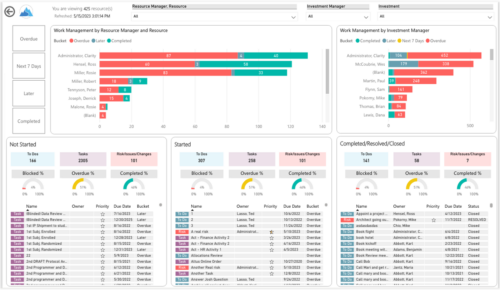
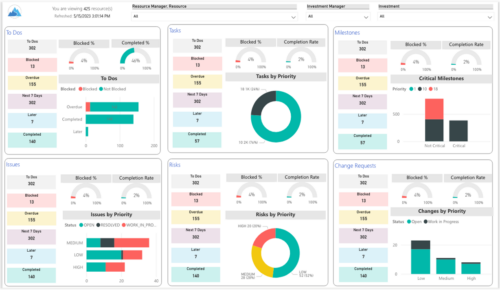 Make sure project deliverables are completed on time by tracking work progress and monitoring task assignments. Report Views include:
- Work Details
- Work Overview
- Work Risk Issue and Change
-
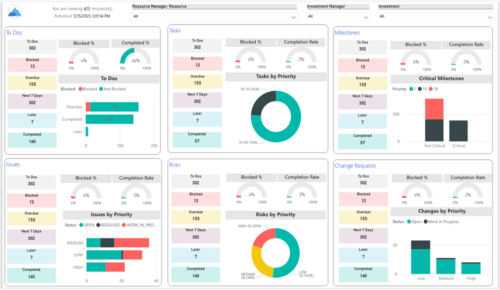
 Make sure project deliverables are completed on time by tracking work progress and monitoring task assignments. Report Views include: • Work Details • Work Overview • Work Risk Issue and Change The main .rpt file will access data through the Data Warehouse. For clients on Rego’s AWS hosting, we have versions that work with Oracle and Postgres DB and access the live database, if the Rego Odata connector is being used.
 -
 A Quick Reference Guide to create / manage Widgets. You can add to any Grid view that supports them. The five types are: Number Tile, Pie, Bar, Progress Ring, and Target.
 -
 A presentation slide deck from Rego University 2022. This course in the Apptio track was about analyzing cost drivers to understand why cost could be changing.
- Questions we’re looking to answer
- Scenarios
- Tools
-
 Have you ever reviewed costs with your stakeholders and suddenly noticed an unexpected change? This class will teach you all the techniques you need to trace down the cause of the discrepancies in the model. We will cover advanced troubleshooting techniques like Metric view for tracing up/down the model and how to leverage model summary reports.
 -
 Did you stray from OOTB? Was that the right decision? This session will be a discussion on pros and cons of sticking to Clarity’s stock attributes, views, and general capabilities. When does it make sense to avoid custom configuration? Conversely, when does it make sense to move beyond the standard OOTB setup?
 -
 Did you stray from OOTB? Was that the right decision? This will be a discussion on pros and cons of sticking to Clarity’s stock attributes, views, and general capabilities. When does it make sense to avoid custom configuration? Conversely, when does it make sense to move beyond the standard OOTB setup?
 -
 Did you stray from OOTB? Was that the right decision? This will be a discussion on pros and cons of sticking to Clarity’s stock attributes, views, and general capabilities. When does it make sense to avoid custom configuration? Conversely, when does it make sense to move beyond the standard OOTB setup?
 -
 ** No Download - Do not Add to Cart ** As Clarity's Modern UX continues to evolve with each release, so has the transition conversation among Clarity Product Owners and Administrators. It's no longer a question of "if" and "when;" the question is, how? In this webinar, we'll explore some best practices that enable a successful shift from Classic to Modern. Through a collaborative discussion of overarching strategies to a step-by-step checklist, this session is designed to help you quickly position your users to take advantage of Clarity's latest and greatest capabilities. Nothing to Download - See Link below. http://info.regoconsulting.com/when-to-move-to-modernux-aug-2020
 -
 Rego’s slide deck on the new features added to Clarity with the release of version 15.9.3. Covers the new features: general and use-ability, project management, roadmap/hierarchy, and resource/staffing.
 -
 In this session, we will explore the latest enhancements and features introduced to ApptioOne over the past year, highlighting the most significant updates that can benefit you or have a substantial impact on your experience.
 -
 A presentation slide deck from Rego University 2022. This document reviews the principles of Scaled Agile Framework.
- Understanding Agile, Scrum, and Kanban
- The Limits of Team Agile
- Scaling Agile
-
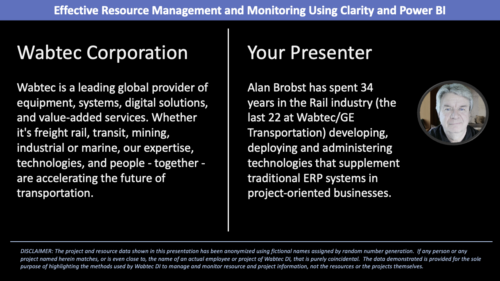 Wabtec shares how they utilized Clarity and Power BI to build an enhanced Resource Management monitoring solution.
 -
 Are you looking for some great examples of dashboards? We know you can’t get enough of them and neither can we! Come to this session to see a host of new reports that Rego has created! This session will review a host of pre-built dashboards in use today that can spark ideas for you to implement in your company. Learn about the Rego approach and method for how we prioritized which reports to create and how we gathered requirements from our Rego experts to target content you need!
 -
 A presentation slide deck from RegoU 2023. This course covered the various visualization tools available in Clarity and help you understand the best way to output your data.
 -
 Are you struggling to come up with a visualization strategy with all of the options available - widgets, portlets, Jaspersoft, Ad Hoc, etc.? This class will explore the various visualization tools available in Clarity and help you understand the best way to output your data. We will provide use cases and examples to assist you in developing a strategy for your organization.
 -
 Are you looking for some great examples of dashboards in Clarity? We know you can’t get enough of them and neither can we! Come to this session to see a host of new reports that Rego has created! This session will review a myriad of pre-built dashboards in use today that can spark ideas for you to implement in your organization. Learn about Rego's approach to prioritize and create reports, and how we gathered requirements from our Rego experts to target the content you need!
 -
 Are you struggling to come up with a visualization strategy with all of the options available - widgets, portlets, Jaspersoft, Ad Hoc, etc? This class will explore the various visualization tools available in Clarity and help you understand the best way to output your data. We will provide use cases and examples to assist you in developing a strategy for your organization.
 -
 A presentation slide deck from Rego University 2022. Broadcom’s presentation on customer stories in the ValueOps arena.
- Introduction
- A note on Customer Case studies
- Transforming Customer
- Profile and Solution Use Case Objectives
- Solution Configuration Diagram
- Lessons Learned through adoption
- Q&A
- Kitchen Sink Customer
- Profile and Solution Use Case Objectives
- Solution Configuration Diagram
- Lessons Learned through adoption
- Q&A
-
 With ValueOps Insights you can gain transparency into full value stream analytics. Come learn about metrics to run your business including flow metrics, DORA, and value realization metrics that give your management team a compass to find the value your teams are delivering.
 -
 When configuring the Timesheet Options, the browse window for selecting a lookup on the User Value 1 field only shows a choice of one lookup definition and that is the definition for the stock 'Time Entry User Value 1' Static Lookup. We want to develop our own user-defined dynamic query lookup for use on this field. How can we get this to work properly? Are there any special requirements or configuration considerations that should be reviewed in understanding this functionality for using a custom Time Entry User Value 1 dynamic query lookup? The use of a custom, dynamic lookup on the Timesheet Entry is available with specific requirements and special considerations for storing and displaying data for this field. It is recommended that you use the stock, 'Time Entry User Value 1' Static Lookup if possible.
 -
 A Quick Reference Guide that provides an overview of the Common Grid components in Clarity PPM’s Modern UX. Looks at functionality of the Common Grid view, View Options, Adjusting Columns, Details Panel, and Group by Mode.
 -
 Learn how to use, and follow best practices with the Clarity REST APIs - Execute a REST Call - Create JSON payloads and parse JSON responses - Capture the result of the request


Copyright 2023 • Rego Consulting Corporation • Privacy Policy