-
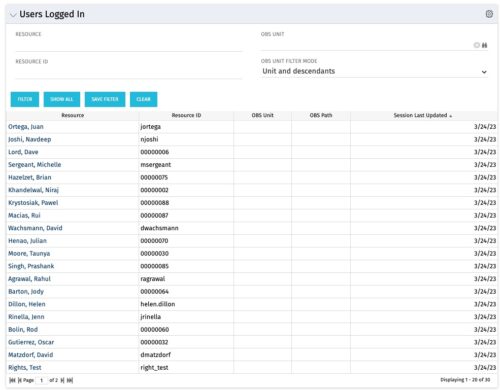 The Users Logged In portlet displays all users logged into the system. This portlet is helpful to determine the capacity during peak times, users still working before downtime, and the ability to view users logged in during the day. The portlet will display the resource, ID, OBS unit, OBS path, and when the user’s session was last updated.
 -
 This beginner-friendly course will begin exploring project management related themes and how they translate to Clarity. We'll discuss resources and calendars that demonstrate resource availability, and project teams which represent demand against your resources.
 -
 Just getting started with Clarity Studio? Join us to learn how to create new objects, CITs, attributes, and lookups in your Clarity environment.
 -
 This course will introduce fundamental programming concepts like variable assignment, conditional statements, and loops. The class will be taught in GEL and will build a solid foundation for future programming skills.
 -
 Struggling to use an external scheduler like MS Project or Smartsheet with Clarity or investigating its potential? Learn how to effectively use these tools with Clarity in this training, which includes best practices and lessons learned. We will show both OOTB and Rego build connectors that will make the bidirectional connections seamless.
 -
 Nudge is a new tool developed by Rego to capture team sentiment in an anonymous, unobtrusive way, using micro surveys through MS Teams.
 -
 Are you struggling to come up with a visualization strategy with all of the options available - widgets, portlets, Jaspersoft, Ad Hoc, etc.? This class will explore the various visualization tools available in Clarity and help you understand the best way to output your data. We will provide use cases and examples to assist you in developing a strategy for your organization.
 -
 To help you stay ahead of the curve, we've asked our 250+ expert guides to share the key trends they've seen firsthand while working with our clients. The result? We are equipped to prepare you for what’s coming next. In this class, Rego’s senior strategists will reveal the top trending PPM / SPM themes and share practical insights to help your organization thrive. Learn what’s shaping the future of PPM / SPM and discover actionable strategies you can utilize right away.
 -
 SPM in Action - a client case study. A current Rego client (Eaton Engineering) will share their SPM journey, including why it was necessary, the technical challenges they faced and how they were addressed, the impact of organizational change, how Rego's expertise and technical assets supported the implementation, and the benefits they're now seeing with their new operating model.
 -
 This class will discuss how other Clarity users solve issues, discover solutions, and successfully use Clarity. As the tool grows in functionality, how should you expect to support the tool and end users. Broadcom's Clarity development team has never been better at getting great capabilities out at a rapid pace, but do you wonder how other organizations, like yours, are keeping up with the enhancements and releases? Come and learn how to drive value for your Clarity investment while not driving your team members crazy with too much change.
 -
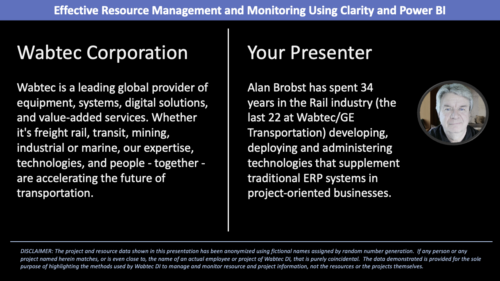 Wabtec shares how they utilized Clarity and Power BI to build an enhanced Resource Management monitoring solution.
 -
 A Quick Reference Guide to assist in the administrative process of populating a Rate Matrix in Clarity. A rate matrix is used during cost plan population and financial transaction processing to determine costs and rates. You can create cost and rate matrices for labor, materials, equipment, and expense resources.


Copyright 2023 • Rego Consulting Corporation • Privacy Policy