
- Introduction
- Configuration Basics
- Security Basics
- Installing Jaspersoft Studio
- Interface Introduction
- Data Adapter Setup
- Server Connection Setup
-
 A presentation slide deck from Rego University 2022. This document is an outline used in class for use of GEL Scripts in Clarity Development.
 -
 Have you never used GEL within Clarity? This class will teach you the basics of leveraging GEL within your workflow process. It’s one of the most powerful and underutilized capabilities in Clarity for updating objects, sending emails, and XOGing. This class is designed for those that have never used GEL before.
 -
 Have you never used GEL within Clarity? This class will teach you the basics of leveraging GEL within your workflow process. It’s one of the most powerful and underutilized capabilities in Clarity for updating objects, sending emails, and XOGing. This class is designed for those that have never used GEL before.
 -

 This training document is a Rego Consulting Quick Reference Guide to assist with General Navigation in Clarity’s Modern User Experience. This doc references version 16.0 views. Doc reviews the Menu Bar and User Tool Bar.
 -
 A Quick Reference Guide to assist with General Navigation of Clarty, using the Classic UX with the Phoenix UI Theme. Reviews the Main Menu Bar, User Tool Bar, Home Menu, Favorites Menu, and more.
 -
 ** No Download - Do not Add to Cart** - Register for the White Paper at this link - http://info.regoconsulting.com/clarity-innovations-from-rego-march-2020 With enterprise-level interconnectivity on the rise, many organizations find that their Clarity toolset isn’t as tightly integrated as it could be. Disparate platforms, annoying redundancies, and personal tool preferences may result in significant losses in time, productivity, and money. In this white paper, we’ll briefly discuss six Rego innovations and connectors designed to help organizations get more out of their Clarity investment. - http://info.regoconsulting.com/clarity-innovations-from-rego-march-2020 With enterprise-level interconnectivity on the rise, many organizations find that their Clarity toolset isn’t as tightly integrated as it could be. Disparate platforms, annoying redundancies, and personal tool preferences may result in significant losses in time, productivity, and money. In this white paper, we’ll briefly discuss six Rego innovations and connectors designed to help organizations get more out of their Clarity investment.
 -
 Course Description: Are your project teams using SharePoint effectively and getting the most value out of it? Is document management a daily struggle? Learn how to use SharePoint with Clarity PPM to seamlessly improve collaboration and team productivity.
 -
 This quick discussion will highlight tips for ensuring you will get the most out of your Rego University experience. We will discuss how to select classes, meet with peers, and obtain one on one advice over the 3 days of the conference.
 -
 Hershey shares their path to Power BI reporting. They discuss Power BI ways of working, Defining Executive Level Metrics, Design & Development, and Next Level Reporting.
 -
 Every chocolate bar starts as a cocoa bean, just like every project starts as an idea. Clarity was designed as the centralized process that transforms raw ideas into beautifully wrapped, ready-to-launch deliverables. It took a partnership across multiple divisions to ensure success!
 -
 In this session you’ll hear about how Hershey’s is using Clarity and Rally to plan and manage their work in a hybrid project management environment. Some of the key capabilities used in both tools will be covered and you’ll hear about their integration approach.
 -
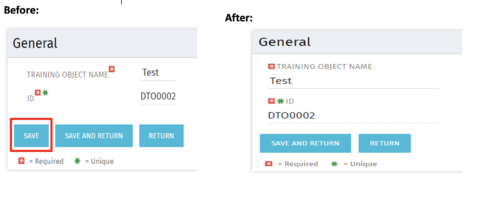 Often, you would want to disallow users from making edits to stay on the same page after changing the data by clicking Save. By forcing the users to click Save and Return, they are forced out of the page. For the above-mentioned reason, the Clarity admin can add the code in the attached tech-trick document, and that will hide the Save button from being displayed.
