-
 This training document is a Rego Consulting Quick Reference Guide to assist with Idea approval and conversion to projects in Clarity’s Modern User Experience. This doc references version 16.0.2 views. Doc reviews setting Ideas as Approved and converting Ideas to projects.
 -
 A slide deck used in Rego’s training sessions around the use of Roadmaps in Clarity’s Modern UX. Reviews the benefits of Roadmaps, security, building a Roadmap, Importing Investments, Board View, and Grid View.
 -
 A Quick Reference Guide to assist in replacing roles with named resources in Clarity’s Classic UI utilizing the Phoenix Theme UI. Reviews access the unfilled roles tab, using the resource finder, replacing the role, and using the booking confirmation portlet.
 -
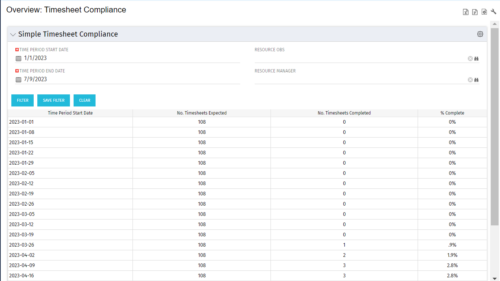 This portlet provides a view into the number of timesheets that were expected to be completed for a specified time period(s) as well as the number of timesheets that were completed and the percent complete. This can also be filtered by OBS so that a company can see timesheet compliance at the OBS level.
 -
 The Clarity Health portlet provides a quick glance into the health of key components and critical jobs in the Clarity environment. The following metrics are monitored: Process Engine Heartbeat should refresh itself every 10 minutes. Process Engine is responsible for the triggering of processes. Green <= 10 Minutes, Yellow 11-15 Minutes, Red > 15 Minutes Time Slices Time Slices are required for accurate reporting. Best practice is for the Time Slicing job to run every minute. Please note there are some jobs that will cause the time slicing to delay so a momentary delay is normal. Green <= 10 Minutes, Yellow 11-15 Minutes, Red > 15 Minutes Datamart Extraction Green <= 24 Hours, Yellow 24-48 hours, Red > 48 hours Datamart Rollup Green <= 24 Hours, Yellow 24-48 hours, Red > 48 hours Rate Matrix - Full Best practice is to run a full rate matrix nightly Green <= 24 Hours, Yellow 24-48 hours, Red > 48 hours Rate Matrix - Incremental Green <= 24 Hours, Yellow 24-48 hours, Red > 48 hours Load Data Warehouse - Full Load Green <= 24 Hours, Yellow 24-48 hours, Red > 48 hours Load Data Warehouse - Incremental Green <= 24 Hours, Yellow 24-48 hours, Red > 48 hours Load Data Warehouse Access Rights Green <= 24 Hours, Yellow 24-48 hours, Red > 48 hours
 -


The Percent Time by Type and Timescale - Grid portlet shows a breakout of time by timescale for resources the logged in user has view rights for using the timeslices. This portlet gives the Clarity user the ability to show the amount of hours spent on a project by week, month, quarter and year. Using this portlet, the Clarity user can get an overview of all hours in a time period or use the filter to search for a specific dataset (as required). The portlet provides a filter for OBS and date ranges. -
 RegoU Presentation from February 2014. Creating a security model that is overly complex and difficult to modify and maintain is easy to do when trying to implement tight security within Clarity. In this session, you will learn some key concepts when designing and implementing security. Additionally, Rego’s team of experts will share tips and tricks for automating security, as well as ways to monitor the Clarity rights that individuals have. The video Presentation can be found on YouTube at this location: https://www.youtube.com/watch?v=dH_UH7rySZM&feature=youtu.be
 -
 A .pdf file that has the slide by slide presentation at 2015 RegoU on enhancing CA PPM performance with a review of root causes and quick solutions.
 -
 ** No Download - Do not Add to Cart ** The Excel Data Manager for Clarity PPM Would you like to process your Clarity PPM data in Microsoft Excel? - Extract - Edit - Validate - Send large datasets It's simple to do using Rego's recently-acquired Excel Data Manager for Clarity PPM. Check out a demo of the solution here. Follow this url to register to view the recorded webinar - http://info.regoconsulting.com/excel-data-mgmt
 -
 ** No Download - Do not Add to Cart** - Register for the White Paper at this link - http://info.regoconsulting.com/clarity-innovations-from-rego-march-2020 With enterprise-level interconnectivity on the rise, many organizations find that their Clarity toolset isn’t as tightly integrated as it could be. Disparate platforms, annoying redundancies, and personal tool preferences may result in significant losses in time, productivity, and money. In this white paper, we’ll briefly discuss six Rego innovations and connectors designed to help organizations get more out of their Clarity investment. - http://info.regoconsulting.com/clarity-innovations-from-rego-march-2020 With enterprise-level interconnectivity on the rise, many organizations find that their Clarity toolset isn’t as tightly integrated as it could be. Disparate platforms, annoying redundancies, and personal tool preferences may result in significant losses in time, productivity, and money. In this white paper, we’ll briefly discuss six Rego innovations and connectors designed to help organizations get more out of their Clarity investment.
 -
 Rego’s course materials for managing projects with Clarity PPM. This slide deck is created using Clarity version 15.6 and focuses on the Classic user interface. The course material covers the following:
- Project Management Overview
- Managing Projects
- Staff the Team
- Work Breakdown Structure (WBS)
- Resource Assignments to Tasks
- Clarity PPM Autoschedule
- Financial Management
- Risks, Issues, and Change Requests
- Controlling a Project
- Program Management
- Portlets and Reports
- Clarity PPM New UX – Life of the PM Interface
-
 This video covers the process of accessing timesheets within Clarity, both as a team member and as a Project or Resource Manager.


Copyright 2023 • Rego Consulting Corporation • Privacy Policy