-
 Does project and idea estimation take too long and lack visibility? This class will address one of the most common pain points within organizations: how to involve the right people within a timely project estimate. Learn some Rego best practices for defining, calculating, and modifying idea and project estimates, so you can increase throughput and ROI.
 -
 Do you want to know the best practices for implementing program management within CA PPM? More and more companies are moving to a form of program management, where projects may not be individually funded, but programs are funded instead. We will walk through how to leverage Clarity for program management, including use cases and what can and cannot be used OOTB.
 -
 Are you considering the use of CA PPM's benefits tracking for planned and/or realized benefits? This session will be a review of common use cases for putting benefits forecasts and realized benefits into CA PPM along with the reporting available out of the box and within RegoXchange.
 -
 Course Description: Are you tracking your vendor contracts outside of Clarity PPM? Have you considered moving the data into Clarity PPM? This session will review a set of use cases where Clarity PPM is being used to manage vendor contracts and how they are linked to resources, projects, and time to drive efficiencies in monitoring contracts and comparing actuals to invoices.
 -
 Do you want to understand the OOTB configuration and functionality of resource management? In this class, we will review the OOTB objects, views, and functions of assignments, allocations, and other related areas. We will cover both classic and new UX highlighting differences.
 -
 This training document is a Rego Consulting Quick Reference Guide to assist with the saving and managing of Roadmap views in Clarity’s Modern User Experience. This doc references version 16.1 views. Document provides detail on the Save As feature for Roadmap views. Detail is provided on views created by others, how to manage existing views and how to save them as favorites. Timeline, Board and Grid view saving options are detailed.
 -
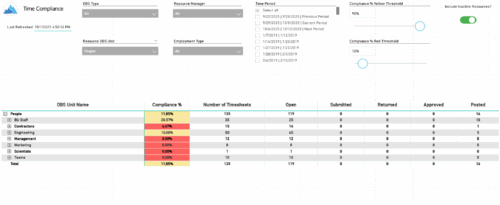 The Time Compliance report displays the timesheet compliance percent, the number of timesheets by status (open, submitted, returned, approved, and posted), and the total for each OBS unit, with the ability to filter and drill down.
 -
 Uncertainty in the economy and the marketplace requires diligent, focused efforts to align the work you plan to deliver with your organization’s strategy and desired business outcomes. Using advanced SPM capabilities in Clarity, we will guide you through interactive exercises to build a hierarchical strategic plan, connect a portfolio of work items to that plan, and begin to visualize the intended flow of value in your portfolio. (Session 1 of 2) Finite limits on people and funding for work items, competing priorities, and ever-present volatility make it challenging to ensure we are investing in the right work, while also demonstrating that we have the necessary resources to deliver results successfully. Building on Session 1, we will continue with interactive exercises to perform constraint-based prioritization and scenario planning, defining our optimal portfolio of work to achieve our business strategy. Then we will explore how we can effectively visualize KPIs and health metrics to measure our performance and identify opportunities for improvement. (Session 2 of 2)
 -
 A Quick Reference Guide to assist in the use of the Objectives Grid view. The Objective grid provides the ability to create new Objectives, filter, add fields to the gird, save and load views, export the list of hierarchies and review the details of an Objective.
 -
 A Quick Reference Guide to assist in the process of associating an OBS with User Access in Clarity’s Modern User Experience. An Organizational Breakdown Structure (OBS) can be used for user access control. Perform these steps if the OBS is required for managing access rights for objects such as resources and investments. Note: the following steps apply to non-financial OBSs and the OBS must exist in the system.
 -
 This training document is a Rego Consulting Quick Reference Guide to assist with the creation and management of Ideas in Clarity’s Modern User Experience. This doc references version 16.3 views. Doc covers creation of ideas, adding columns to the grid view and editing existing ideas.
 -
 This training document is a Rego Consulting Quick Reference Guide to assist with Entering and Submitting Time in Clarity’s Modern User Experience. This doc references version 16.3 views. Document includes Accessing & Selecting Timesheets, Populate Timesheet, Updating Timesheet, Submitting Timesheet and Entering Time for Someone Else.


Copyright 2023 • Rego Consulting Corporation • Privacy Policy