-
 A Quick Reference Guide to assist in the administrative process of updating an OBS in Clarity. An Organizational Breakdown Structure (OBS) is a hierarchical structure you can use to align resources, projects and investments. Note: the following steps apply when updating a non-financial OBS. The financial OBS (Department and Location OBS) are generally setup as part ofthe Clarity implementation.
 -
 A Quick Reference Guide to assist in the use of the Objectives Board View. The view options allow you to customize the Board layout. Options include Columns, Swimlanes, Color and Labels.
 -
 A Quick Reference Guide to assist in the creation of Objectives in Clarity. Clarity now has an out of the box module called objectives which can replace a custom objective module that was previously created and has default attributes for both Objectives and Key Results (sub-object).
 -
 A Quick Reference Guide to assist in the use of the Objectives Grid view. The Objective grid provides the ability to create new Objectives, filter, add fields to the gird, save and load views, export the list of hierarchies and review the details of an Objective.
 -
 A Quick Reference Guide to assist in setting up a login message that users can see whenever they log into Clarity. QRG walks through the configuration steps. Message Severity and duration can also be setup.
 -
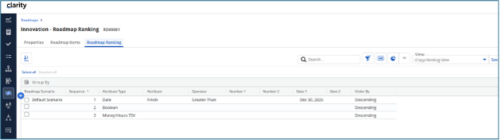
 The Rego Roadmap Ranking provides the ability to rank Roadmap Items within individual Roadmap Scenarios. The function allows the user to define a hierarchical sequence to defined attributes to create a set of rules to generate an auto-ranking, by scenario. Large sets of ranking rules increase complexity and variability, so choose initial rules carefully. When the rank order is configured, a process is actioned that auto-ranks the Roadmap Items for the selected Roadmap Scenario. The Roadmap Ranking can be viewed through the Timeline, Board, or Grid View.
 -
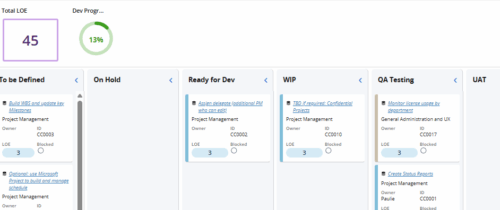 Leverage a Kanban or Sprint approach to manage Clarity Implementation and ongoing improvements. List also serves as a history of configuration changes, reasons, and deployment dates.


Copyright 2023 • Rego Consulting Corporation • Privacy Policy