-
 A Quick Reference Guide to create / manage Widgets. You can add to any Grid view that supports them. The five types are: Number Tile, Pie, Bar, Progress Ring, and Target.
 -
 A Quick Reference Guide on setting up Custom Investments in Clarity’s Modern UX. Reviews setting up the Custom Investment, and creating Custom Investment Records.
 -
 This training document is a Rego Consulting Quick Reference Guide to assist with creating and management of a project team in Clarity’s Modern User Experience. The document reviews accessing teams, creating a team, allocating a team on an investment, as well as additional team related information.
 -
 This training document is a Rego Consulting Quick Reference Guide to assist with creating a new project in Clarity’s Modern User Experience. The document reviews this both in the Project Page and in the Project Tiles locations.
 -
 A Quick Reference Guide that reviews access to Project Tasks and Task To Dos in Clarity PPM’s Modern UX.
 -
 ** No Download - Do not Add to Cart** - Register for the White Paper at this link - http://info.regoconsulting.com/create-rmo-that-works-2020 Is your organization struggling to make sure you have the right people working on the right initiatives to meet your objectives? If so, you’re not alone. In this white paper, Rego’s Grant Zemont provides insight on what your company can do to create an RMO to get you pointed in the right direction for success.
 -
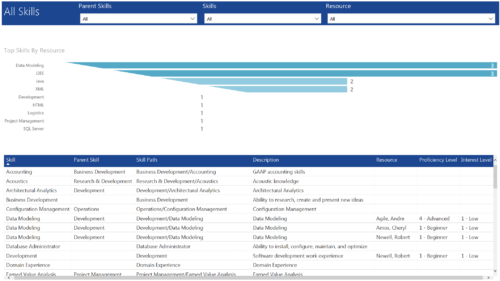 All Skills report provides project managers a single place to view number of resources having a particular skill and its detailed information. This report contains a bar graph and a grid. Top Skills by Resource: Bar graph that displays # of resources having a particular skill. Y- Axis represents various skills available in the system. Resource and Skill details grid: Grid that displays information such as Skill, its parent skill, Skill path, Skill Description, Resource having that skill & his proficiency and interest level in that skill. You can further narrow your search by Parent Skills, Skills and Resource.
 -
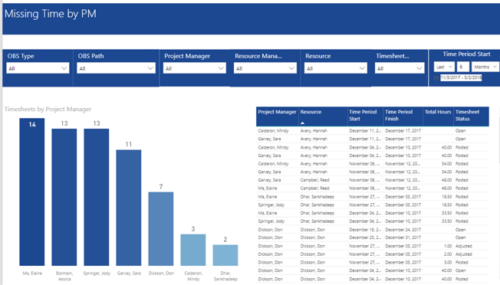 Missing Time by PM report displays Resources whose timesheets are missed by Project Manager. There is Clustered Column Chart which displays missed timesheets count by Project Manager. Also, there is table view of Project Manager, Resource, Time Period Start and Finish Dates, Total Hours and Timesheet status. User can narrow their search by OBS Type & Path and Project Manager, Resource Manager, Resource, Timesheet Status and Time Period Start Date (Relative or Specific Date Range).
 -
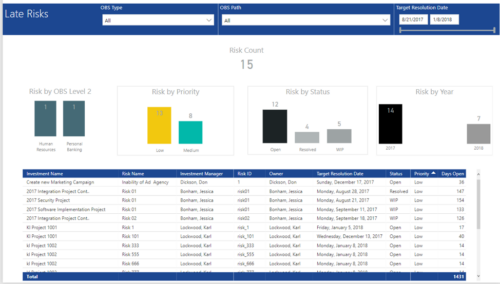 Late Risk report provides the Project Managers a single place to view all the Open Risks that are past their target resolution date. This report provides information such as Risk Count, Risks by OBS Level 2, Priority, Status and Year in Stacked Column Chart. In addition, this report has also Table view of Risk information such as Investment Name, Risk Name, Investment Manager, Risk ID, Owner, Target Resolution Date, Status, Priority and Days Open. User can further narrow their search by OBS Type & Path and Target Resolution Date.
 -
 Learn advanced administrative development tasks—including Objects and Fields, Object Portlets, Basic Processes, and XOG. In the last portion of this class we will walk through the high-level data model within the CA PPM database and walk through some basic NSQL portlets. This is a more technical class focusing on basic configurations - designed for non-technical people (especially the last 3 hours of the day)
 -

A presentation slide deck from Rego University 2022. This document reviews the best practices for using Roadmaps in Clarity. - Before Getting Started
- Do’s and Don’ts
- Bells and Whistles to Leverage


Copyright 2023 • Rego Consulting Corporation • Privacy Policy