-
 Clarity's Modern Experience has been a game changer for end-users, but did you know there are some fantastic capabilities for admins? Come to this session to learn about how to set up the modern experience, the module capabilities, blueprints, fields/attributes, and how to personalize your experience.
 -
 You can now directly query your CA PPM SaaS database without the need for VPN. Utilize the open source SQL client SQuirreL to write read-only queries (up to 1000 rows) against the database.
 -
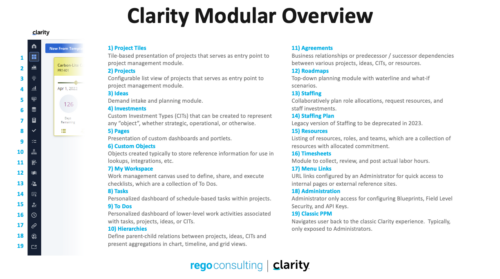 A quick reference guide that reviews all of the icons used in the vertical menu bar and provides a quick explanation on their meaning/use.
 -
 This training document is a Rego Consulting Quick Reference Guide to assist with the utilization of Tasks and To Do’s in Clarity’s Modern User Experience. This doc references version 16.0.3 views. Document references the Tasks and To Do’s menu items and their associated widgets.
 -
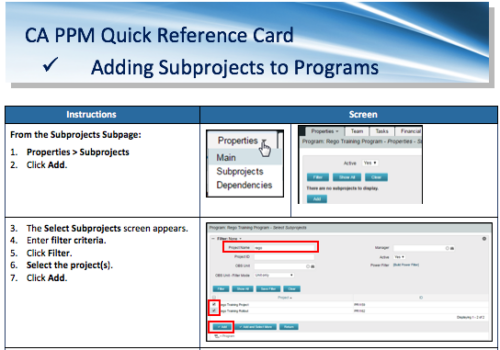 A Quick Reference Card to assist in the adding of Subprojects to Programs. Shows how add and remove from the Subprojects Subpage or from the Hierarchy Tab.
 -
 Course Description: Are you tracking your vendor contracts outside of Clarity PPM? Have you considered moving the data into Clarity PPM? This session will review a set of use cases where Clarity PPM is being used to manage vendor contracts and how they are linked to resources, projects, and time to drive efficiencies in monitoring contracts and comparing actuals to invoices.
 -
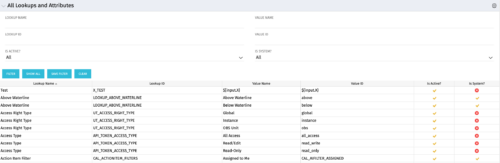 The All Lookups and Attributes portlet provides the ability to see all static lookups in the system, as well as their lookup values. Ability to filter and view the population by lookup name and ID, value name and ID, whether or not the item is active, and whether or not the item is a system (seeded) value. A system value is a record that comes with a base installation of Clarity as opposed to a value that was added manually or through a Clarity Add-in.
 -
 This training document is a Rego Consulting Quick Reference Guide to assist with the saving and managing of Roadmap views in Clarity’s Modern User Experience. This doc references version 16.1 views. Document provides detail on the Save As feature for Roadmap views. Detail is provided on views created by others, how to manage existing views and how to save them as favorites. Timeline, Board and Grid view saving options are detailed.
 -
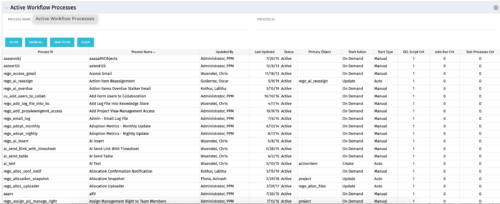 The Active Workflow Processes allows you to view all of the workflow processes within the system. It shows information about the process: the objects related, the start type, and if the process has sub-processes, jobs, or GEL scripts. This portlet is used by admins to determine how many processes are currently running in the system and on which objects. It will also display the start action, how many GEL scripts reside in the process, the run count and how many the sub-processes each process has. This information is helpful during upgrades and other testing.
 -
 A Quick Reference Guide to assist in the use of the Objectives Grid view. The Objective grid provides the ability to create new Objectives, filter, add fields to the gird, save and load views, export the list of hierarchies and review the details of an Objective.
 -
A Quick Reference Guide to assist in the process of associating an OBS with User Access in Clarity’s Modern User Experience. An Organizational Breakdown Structure (OBS) can be used for user access control. Perform these steps if the OBS is required for managing access rights for objects such as resources and investments. Note: the following steps apply to non-financial OBSs and the OBS must exist in the system.
-
 If your organization is adopting Objectives and Key Results (OKR) framework, this session is for you. Through a role play exercise you will learn how to spot and write some really solid OKRs.


Copyright 2023 • Rego Consulting Corporation • Privacy Policy