-
 The Project Risk Register report provides visibility into project risks, including detailed information on each risk and its associated items such as notes, action items, tasks, and related risks or issues. Results can be grouped by project or viewed without grouping to support flexible analysis. Interactive visuals make it easy to track, monitor, and manage risks across projects.
 -
 Bringing back a classic topic with a modern update! Join this session to discuss tips and tricks for an optimized project manager experience in Clarity. This session is designed so attendees can share, collaborate, and benefit from their diverse experiences.
 -
 Bringing back a classic topic with a modern update! Join this session to discuss tips and tricks for an optimized PMO experience in Clarity. This session is designed so attendees can share, collaborate, and benefit from their diverse experiences.
 -
 To help you stay ahead of the curve, we've asked our 250+ expert guides to share the key trends they've seen firsthand while working with our clients. The result? We are equipped to prepare you for what’s coming next. In this class, Rego’s senior strategists will reveal the top trending PPM / SPM themes and share practical insights to help your organization thrive. Learn what’s shaping the future of PPM / SPM and discover actionable strategies you can utilize right away.
 -
 London Stock Exchange shares their Clarity journey (since 2008) and where they want to take the tool next. Current goals are: • Moving toward standardized ways of working. Focused on connecting our ecosystem of tools with Clarity as a focal point for Portfolio Management and SPM. • With an end goal of Faster Time to Market, on a journey to be a Customer Lead organization.
 -
 Every chocolate bar starts as a cocoa bean, just like every project starts as an idea. Clarity was designed as the centralized process that transforms raw ideas into beautifully wrapped, ready-to-launch deliverables. It took a partnership across multiple divisions to ensure success!
 -
 SPM in Action - a client case study. A current Rego client (Eaton Engineering) will share their SPM journey, including why it was necessary, the technical challenges they faced and how they were addressed, the impact of organizational change, how Rego's expertise and technical assets supported the implementation, and the benefits they're now seeing with their new operating model.
 -
 Hear from existing Clarity customers as they share what's working well in their implementations. Gain insights from these real-world success stories. This deck is from Day 2 of the presentations.
 -
 Hear from existing Clarity customers as they share what's working well in their implementations. Gain insights from these real-world success stories. This deck is from Day 1 of the Client Presentations.
 -
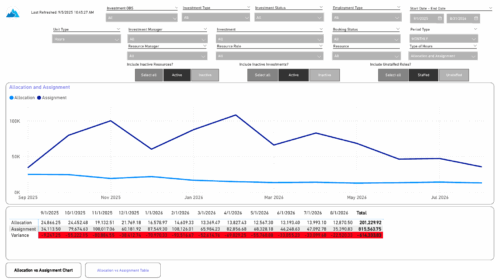 The Investment Allocations and Assignments report provides visibility into team member allocation, task assignment, and variance amounts by investment across time periods. A chart highlights allocation compared to assignment amounts by period. Results can be displayed by week, month, or in total, and viewed in either hours or FTEs for each team member and investment. Interactive visuals make it easy to compare planned effort against actual assignments at the team member and investment level. Content Type: Business Intelligence, PowerBI Report
 -
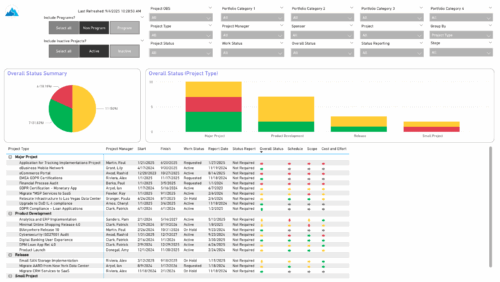 The Project Status Report List provides a consolidated view of project health, including schedule dates, work status, and key status indicators. Users can group results by Portfolio Category, Overall Status, Project Type, Stage, Project Manager, Sponsor, or OBS Level, with the report dynamically adjusting its columns based on the grouping selected. Visuals include an overall status pie chart that shows the percentage of projects by status color, and a column chart that breaks down project counts by status, aligned to the chosen grouping option.
 -
 If you work in a busy Project Management Office (PMO), then you know that good quality data is paramount to effective planning, decision making, and project delivery. You also know that sometimes a single data point can be enhanced when it is supplemented by additional information. But as an administrator or part of the PMO, how can you guide team members to ensure they enter meaningful data into your project management system? Clarity now offers the capability to create business rules which can enforce data-entry based on the way that other attributes have been updated. In this article, you’ll get step-by-step instructions on how to update your Clarity blueprints to utilize the new Conditional Required Modal.


Copyright 2023 • Rego Consulting Corporation • Privacy Policy