-
 Have you considered using Rally in conjunction with Clarity? Have you seen or heard about the OOTB connector? This class will go through the OOTB connector in detail and show how Rego has built our ad-on to enhance the connectivity between these two tools.
 -
 This class will discuss how successful Clarity users solve issues, discover solutions, and successfully utilize Clarity. As the tool grows in functionality, learn how you can support the tool and end users. Drive value for your Clarity investment by supporting end users and a technically healthy implementation at the same time.
 -
 This class will discuss how other Clarity users solve issues, discover solutions, and successfully use Clarity. As the tool grows in functionality, how should you expect to support the tool and end users. Broadcom's Clarity development team has never been better at getting great capabilities out at a rapid pace, but do you wonder how other organizations, like yours, are keeping up with the enhancements and releases? Come and learn how to drive value for your Clarity investment while not driving your team members crazy with too much change.
 -
A Rego produced document that shows the stock reports and views in Clarity. Also includes views of Power BI reports available in RegoXchange. 193 pages.
-
 RegoU Presentation from February 2014. Creating a security model that is overly complex and difficult to modify and maintain is easy to do when trying to implement tight security within Clarity. In this session, you will learn some key concepts when designing and implementing security. Additionally, Rego’s team of experts will share tips and tricks for automating security, as well as ways to monitor the Clarity rights that individuals have. The video Presentation can be found on YouTube at this location: https://www.youtube.com/watch?v=dH_UH7rySZM&feature=youtu.be
 -
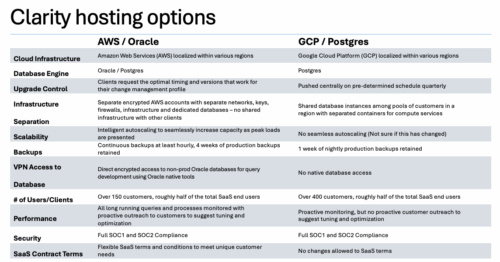

A one page comparison of of the two Clarity SaaS platforms. Broadcom's GCP vs the Rego AWS hosting platforms. Compares Cloud Infrastructure, Database Engine, Upgrade Control, Scalability, Performance and more.
-
 ** No Download - Do not Add to Cart** - Register for the White Paper at this link - http://info.regoconsulting.com/clarity-roadmaps-fastest-route-to-success Anyone who’s taken a road trip knows the value of a good map. It tells you where you’re going, how long it might take to get there, and where you are at any given time. Your organization’s strategic journey is no different. Whether it’s your corporate strategy or individual investments, you’re heading into territory that could include all kinds of intersections, delays, and detours that could impact your plan. A good roadmap will give you the critical information you need to ensure a smooth journey. In this white paper, we discuss how using Clarity's Roadmap feature will get you pointed in the right direction for success.
 -
 Do you want to improve the success of your CA PPM projects? This class will discuss some lessons learned on making CA PPM projects more successful. We will discuss things like
- developing robust test plans, creating effective use and test cases, and implementing test scripts that make sense.
- why failures occur, and what you can do to minimize the impact and plan for success: case study in lessons learned.
- developing, testing, fine tuning, and executing deployment plans for success.
-
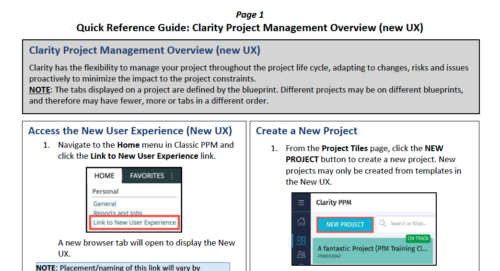 Clarity has the flexibility to manage your project throughout the project life cycle, adapting to changes, risks and issues proactively to minimize the impact to the project constraints. NOTE: The tabs displayed on a project are defined by the blueprint. Different projects may be on different blueprints, and therefore may have fewer, more or tabs in a different order.
 -
 Move to the cloud. It’s a refrain that’s become frequent and familiar to organizations of all sizes. Choosing software-as-a-service (SaaS) over traditional on-premise software is generally a no-brainer these days for standard user apps. But do the same advantages apply to data-intensive systems like Clarity PPM? This paper explores the pros and cons of transitioning from on-premise Clarity PPM to its cloud alternative. This White Paper is downloaded from the Rego Consulting site. You will be asked to provide your email address and current ppm tool. - http://info.regoconsulting.com/cappm-onpremise-or-saas-wp ** No Download - Do not Add to Cart **
 -
 Course Description: Can your Clarity PPM support team become more efficient? This class will discuss how other users solve issues, discover solutions, and successfully use Clarity PPM. We will review industry best practices and how to support your user base with the optimal team.
 -
 This tech trick document reviews the different reporting options you have in CA PPM and the benefits of each options. Jaspersoft, PowerBI and Tableau are all discussed.


Copyright 2023 • Rego Consulting Corporation • Privacy Policy