-
 Struggling to use an external scheduler like MS Project or Smartsheet with Clarity or investigating its potential? Learn how to effectively use these tools with Clarity in this training, which includes best practices and lessons learned. We will show both OOTB and Rego build connectors that will make the bidirectional connections seamless.
 -
 Clarity’s new reporting capabilities deliver interactive insights directly within the platform—no data exports required. In this session, you’ll learn how to harness the latest reporting features to empower decision-makers, visualize portfolio performance, and tell compelling stories with your data.
 -
 Want to keep your Clarity environment running efficiently? In this class we'll discuss how to maintain your Clarity environment through the use of jobs, processes, and configuration. We'll also cover recommended maintenance activities to ensure your environment is running optimally.
 -
 This training document is a Rego Consulting Quick Reference Guide to assist with the creation of Status Reports in Clarity’s Modern User Experience. This doc references version 16.1 views. Document covers the creation of Status Reports via the Status Module as well as the Status Report Module. Detail is provided on the widgets that can be used within the Status Report canvas as well as instructions on how to configure the canvas. Detail is also provided on how to Preview and Publish status reports.
 -
 This training document is a Rego Consulting Quick Reference Guide to assist with the use of the Staffing View in Clarity’s Modern User Experience. This doc references version 16.1 views. Document provides information on how to swap between views to see investments by resource or resources by investment. Instructions on filtering are provided, as well as detail on how to update the unit of measure between FTE (Full Time Equivalent) and Hours. Tips are provided on how to expand the list of investments within each view and how to view the properties for the allocations. A Legend is also documented to provide information on each of the icons that are displayed on this page.
 -
 Course Description: Have you ever thought of using Clarity PPM for surveys or quality audits? Would you like to create dashboards with metrics from surveys, lessons learned, project audits, and quality? In this class, we will review a customer use case where all of this was done in Clarity PPM—linking to SharePoint to capture survey results, then producing dashboards inside of PPM and SharePoint based on very specific metrics.
 -
 Are you ready to take your GEL scripting skills to the next level? This class will teach you how to leverage Java within GEL, manipulate or produce flat files, and handle errors effectively.
 -
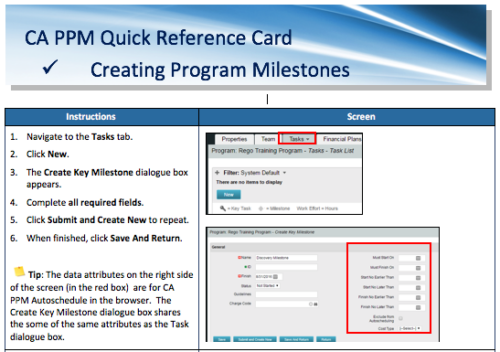 A Quick Reference Card to assist in the creation of Program Milestones in CA PPM. This can be done from the Tasks Tab or from the CA PPM Gantt.
 -
 Are you struggling with the best way to manage new CA PPM releases? In this class you’ll learn the best practice for testing, release cadence, prioritization, and migration to higher environments. We will review strong business cases and discuss roles and process.
 -
 This training document is a Rego Consulting Quick Reference Guide to assist with managing Task Assignments in Clarity’s Modern User Experience. The document covers creating new assignments and updating ETC.
 -
 This training document is a Rego Consulting Quick Reference Guide to assist with creating Custom Investments in Clarity’s Modern User Experience. The document reviews creating a Custom Investment Type and creating a Custom Investment Record.
 -
 This training document is a Rego Consulting Quick Reference Guide to assist with management of Custom Investments in Clarity’s Modern User Experience. The document reviews navigation to a custom investment and then the various tabs related to the management of the investment.


Copyright 2023 • Rego Consulting Corporation • Privacy Policy