-
 This training document is a Rego Consulting Quick Reference Guide to assist with creating Custom Investments in Clarity’s Modern User Experience. The document reviews creating a Custom Investment Type and creating a Custom Investment Record.
 -
 This training document is a Rego Consulting Quick Reference Guide to assist with the Staffing Plan. The document reviews accessing the Staffing Page, viewing Resource Allocations, adding Allocations, and the Staff Tab Legend.
 -
 This training document is a Rego Consulting Quick Reference Guide to assist with managing Task Assignments in Clarity’s Modern User Experience. The document covers creating new assignments and updating ETC.
 -
 A Quick Reference Guide to assist in the process of converting a Idea into an Investment in Clarity. Includes information on adding financial and resource data into the new investment.
 -
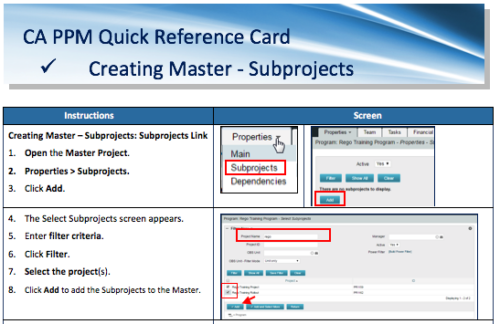 A Quick Reference Card to assist in the creation of Master-Subprojects in CA PPM.
 -
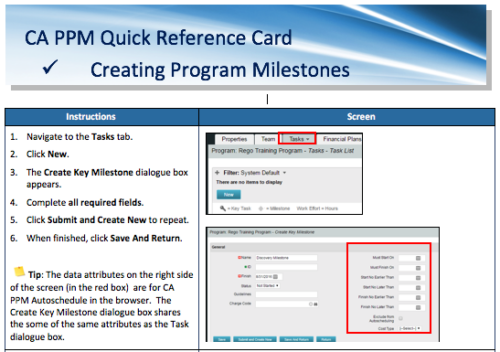 A Quick Reference Card to assist in the creation of Program Milestones in CA PPM. This can be done from the Tasks Tab or from the CA PPM Gantt.
 -
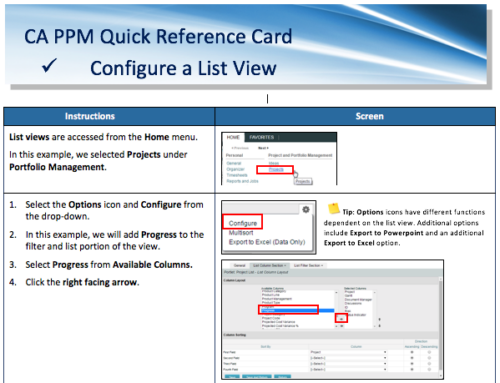 A Quick Reference Card for configuring List Views in CA PPM. List views are accessed from the Home menu.
 -
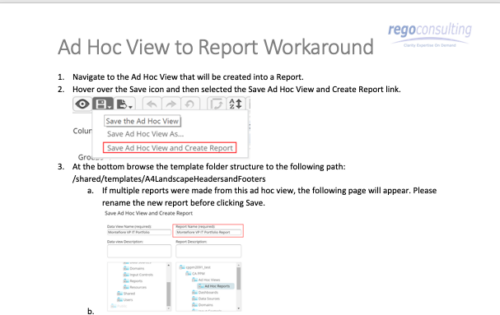 This tech-trick details the steps to convert an ad-hoc view to a report.
 -
 Do you want to add interfaces to your CA PPM instance? This class will review the pros and cons of various integration methods and provide best practice on how to handle various interfaces. We’ll walk you through specific interface examples and showcase Rego’s pre-built interface sets you can leverage to reduce the time and cost of implementation.
 -
 Course Description: Have you ever thought of using Clarity PPM for surveys or quality audits? Would you like to create dashboards with metrics from surveys, lessons learned, project audits, and quality? In this class, we will review a customer use case where all of this was done in Clarity PPM—linking to SharePoint to capture survey results, then producing dashboards inside of PPM and SharePoint based on very specific metrics.
 -
 Are your project teams using SharePoint effectively and getting the most value out of it? Is document management a daily struggle? Learn how to use SharePoint with Clarity in a more seamless way to improve collaboration and team productivity.
 -
 Do you want to understand the OOTB configuration and functionality of roadmap management? In this class, we will review the OOTB objects, views, and functions of roadmap management.


Copyright 2023 • Rego Consulting Corporation • Privacy Policy