
Resource Allocations and Assignments (Power BI)
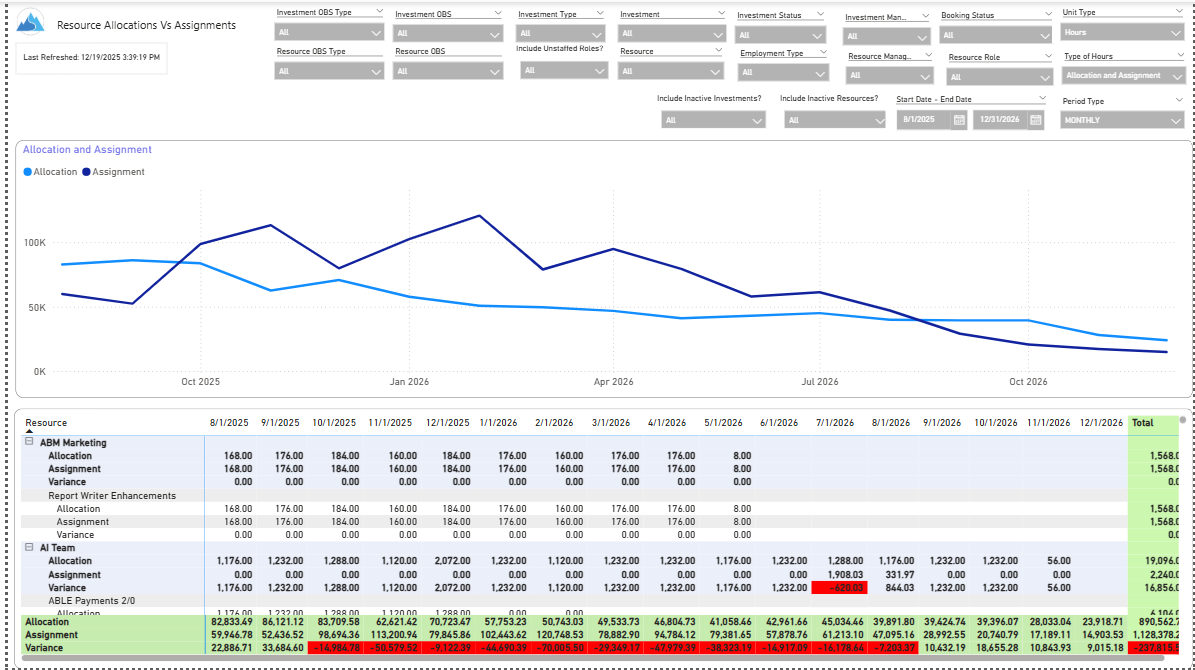
The Allocations and Assignments report displays resource assignments and allocations across multiple projects. This report will provide a single view of the assigned data for all assignments across multiple projects in-line with their allocations. The data is displayed by monthly periods. The horizontal and vertical sums provide a cumulative picture resource wise and month wise respectively.
Filters provide the user the ability to monitor data across multiple projects. Filters include investment type, investment, resource, active/inactive resource or investment along with OBS type and OBS unit.
If multiple projects are utilizing the same resource, the PM or RM can filter for assignments/allocations utilizing that specific resource to prevent over-allocations or under-allocations.
Download Details
RegoXchange Content ID: EX2817
Submission Date: 2/10/2026
Submitter:
Content Type: Business Intelligence
Related Modules: Allocations
Company: Rego Consulting
Version Support
Versions Supported: v16.3+
Special Instructions
Special Instructions: See RegoXchange item #EX1565 – “Using RegoXchange Power BI Reports – How to Update the Data Source” for more details on implementing this report.
