
Capacity vs Booking Status by OBS (Power BI)
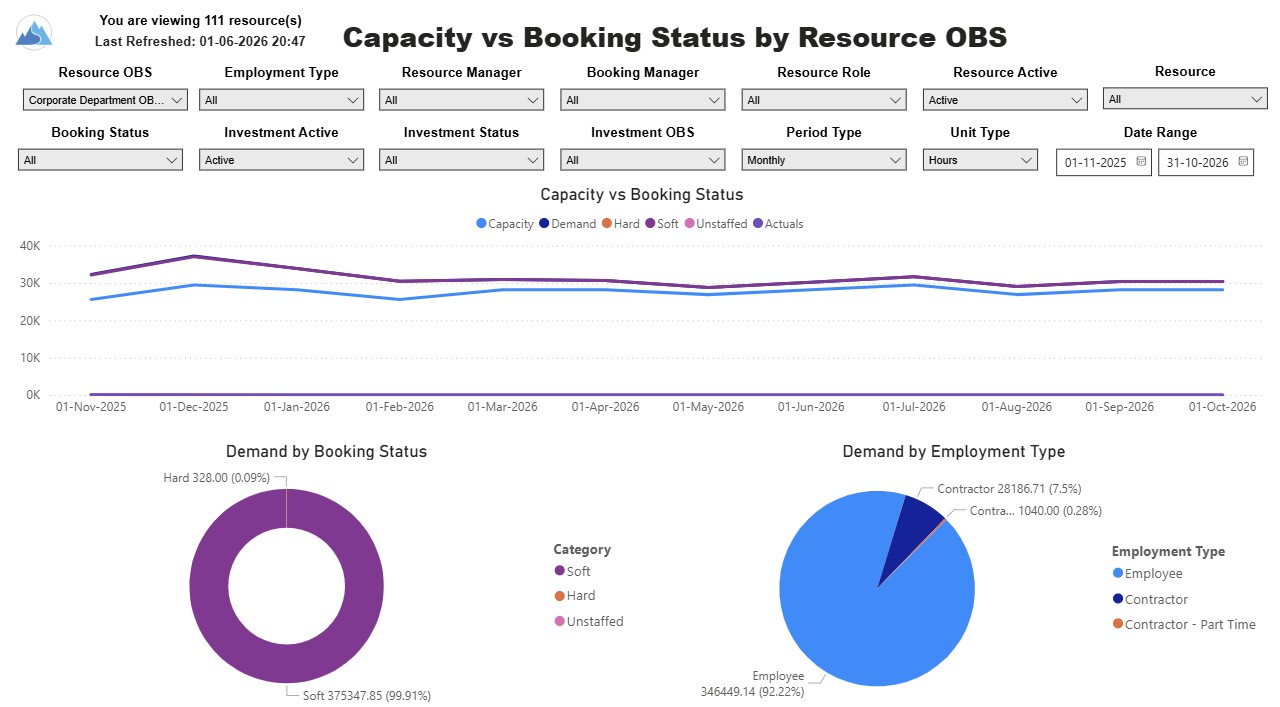
The Capacity vs. Booking Status by OBS report includes three charts. The line chart displays capacity compared to demand, with demand distributed by booking status, and actuals by period. The pie charts display demand by booking status and demand by employment type. The report also includes a detail listing of resource capacity and demand at the booking status level across investments. The report can be grouped by any OBS level, providing visibility into resources at any level of the organization. The report displays amounts by week or month, and in total. The amounts can be displayed as hours or FTEs.
Report Prerequisites
Verify that you have completed the following prerequisites before you run this report:
• Resource capacity amounts display if the resource has availability that is defined and meets the parameter criteria.
• Resource demand allocation amounts display if the resource is allocated to at least one investment. Resource assignments are not required.
• The Load Data Warehouse job must be run before you run this report. If the Data Warehouse is not populated, the report will not display any data. Also, most of the report parameters do not display options.
Download Details
RegoXchange Content ID: EX2813
Submission Date: 1/9/2026
Submitter:
Content Type: Business Intelligence
Related Modules: Resource Management
Company: Rego Consulting
Version Support
Versions Supported: v16.3+
Special Instructions
Special Instructions: See RegoXchange item #EX1565 – “Using RegoXchange Power BI Reports – How to Update the Data Source” for more details on implementing this report.
