
Investment Change Request Register (Power BI)
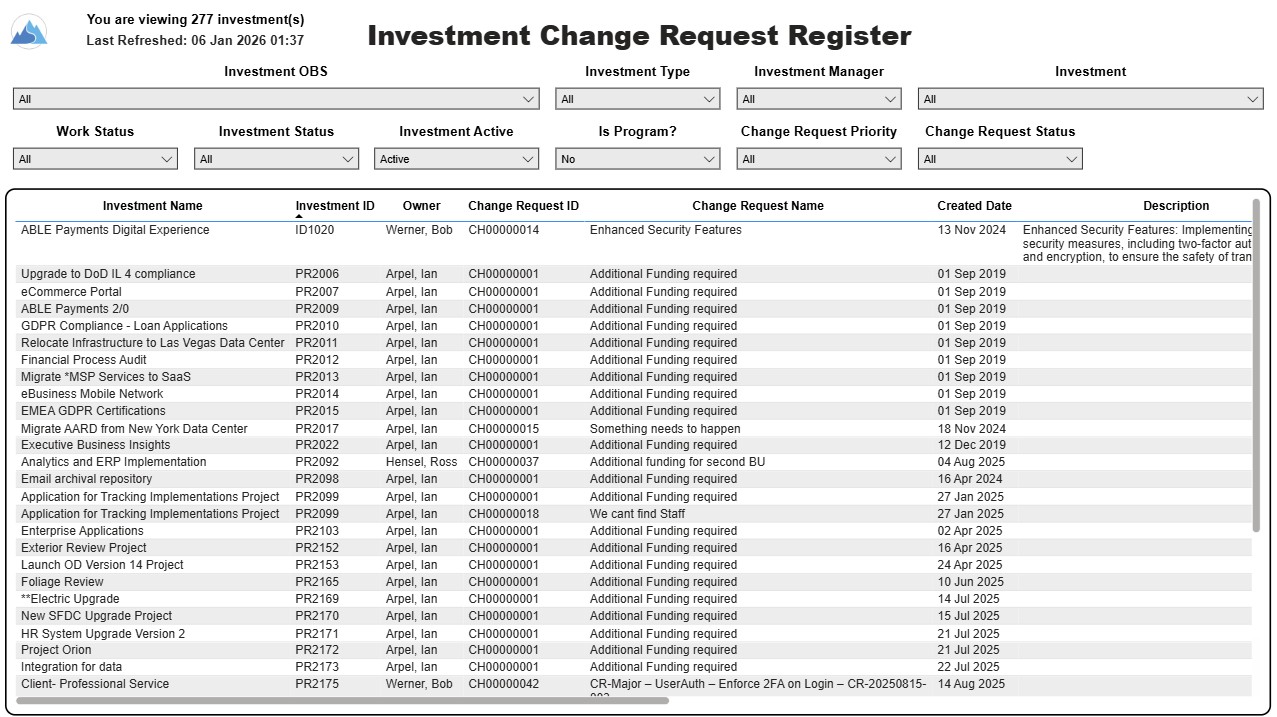
The Investment Change Request Register report displays comprehensive information for each investment change request. The report only includes investments where the Risk, Issues and Change modules are available.
Report Prerequisites
Verify that you have completed the following prerequisites before you run this report:
• The investment must have at least one change request for the project to display in the report.
• The change request properties must have fields such as description, change in cost, change in schedule, change in resources, category, expected close, approved by, approved date, and originating ID completed for them to display data in the report. The change request name, change request ID, priority, status, and owner are required in Classic PPM so they always display data.
• The Load Data Warehouse job must be run before you run this report. If the Data Warehouse is not populated, the report will not display any data. Also, most of the report parameters do not display options.
Download Details
RegoXchange Content ID: EX2814
Submission Date: 1/9/2026
Submitter:
Content Type: Business Intelligence
Related Modules: Changes
Company: Rego Consulting
Version Support
Versions Supported: v16.3+
Special Instructions
Special Instructions: See RegoXchange item #EX1565 – “Using RegoXchange Power BI Reports – How to Update the Data Source” for more details on implementing this report.
